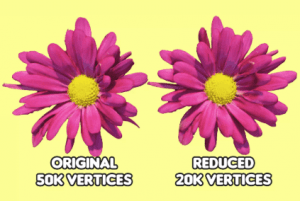
Polygon Reducer optimizes your meshes by reducing their vertex count in a way that keeps the visuals as close to the original as possible. It works great for setting up levels of detail (LODs)!
For more details about this asset: Click Here
This is a paid asset, but now you can download the “Polygon Reducer” for FREE. Please keep in mind that this package is provided only for learning purposes or to test before buying the product, NOT FOR COMMERCIAL PURPOSES.
Polygon Reducer v1.1.0
“Sharing is caring”
Description
Polygon Reducer makes it easy to optimize your game – simply drag the reduction slider and watch your mesh be transformed in real time. It works both at runtime and in the editor!
Supports:
All Long Term Support (LTS) versions of Unity;
All render pipelines: Built-In, URP, HDRP, and SRP;
Skinned models with animations;
Models with any number of submeshes.
And also:
Preserves all mesh data: UVs, normals, tangents, bone weights, and more;
Has a low memory footprint;
Creates reduced meshes at runtime – no need to store them in your disk!
You can easily set up LOD components with Polygon Reducer – simply clone the original mesh, add the Polygon Reducer component to it, and then use the cloned object as a renderer on the LOD component.
Try it now and start adding more objects to your scene – all while keeping a steady framerate!
Technical details
All Long Term Support (LTS) versions of Unity supported;
Built-in Render Pipeline, URP, & HDRP compatible;
Supports skinned models with animations;
Supports models with multiple submeshes;
Preserves all mesh data: UVs, normals, tangents, bone weights, and more;
Has a low memory footprint;
Creates reduced meshes at runtime – no need to store them in your disk!