Essential organization asset. vFolders 2 helps you to organize your project and provides many workflow improvements and decoration options.
For more details about this asset: Click Here
This package is provided solely for evaluation, learning, or testing purposes before purchase and is not permitted for commercial use.
vFolders 2 v2.1.16 (Latest version)
vFolders 2 v2.1.16
vFolders 2 v2.1.14
vFolders 2 v2.1.13
vFolders 2 v2.1.5
vFolders 2 v2.0.10
“Sharing is caring”
Reasons to upgrade from vFolders 1.0
vFolders has been completely reworked and received a ton of productivity features, but remained minimal and lightweight
Multiselection editing – set multiple icons or colors at once
Customizable palette – add custom icons, export for use in other projects
Customizable appearance – decorate folder tree to your liking
Shortcuts like in vHierarchy – save time expanding and collapsing folders
Content minimap – see what’s inside folders without opening them
Store data in .meta files – an option for teams to avoid merge conflicts
Aesthetic improvements – small adjustments that make the difference
Performance improvements
Essential organization asset
vFolders 2 helps you to organize your project and provides many workflow improvements and decoration options
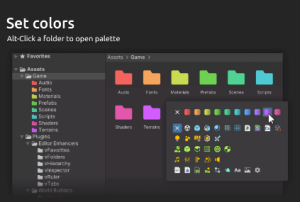
Custom icons and colors
– Highlight important folders
– Improve readability of project view
Automatic icons
– Sets icons based contents of folders
Content minimap
– See types of assets inside folders
Customizable palette
– Add icons
– Adjust colors
– Export for use in other projects
Customizable appearance
– Hierarchy lines
– Clearer rows
– Minimal mode
– Zebra striping
– Content minimap
Shortcuts (work on the folder under mouse, no need to select it)
– Press E to expand or collapse
– Press Shift-E to expand only one object
– Press Ctrl-Shift-E to collapse everything