Bookmark the most important folders, assets and GameObjects and focus on the development instead of clicking all around the editor to find that one object.
For more details about this asset: Click Here
This is a paid asset, but now you can download the “vFavorites 2” for FREE, Please keep in mind this package is provided only for learning purposes or to be able to test before buying the product, NOT FOR COMMERCIAL PURPOSES.
vFavorites 2 v2.0.15 (05 Mar 2026) (Latest version)
vFavorites 2 v2.0.14 (19 Dec 2025)
vFavorites 2 v2.0.10 (22 Sep 2025)
vFavorites 2 v2.0.10 (13 Feb 2025)
vFavorites 2 v2.0.9
vFavorites 2 v2.0.7
“Sharing is caring”
Reasons to upgrade from vFavorites 1.0
vFavorites has been reworked to include the most requested features, while maintaining the minimal design
GameObjects support – bookmark the most used objects
Multiple renamable pages – simple way to organize your favorites
Keyboard navigation – for even faster access to favorites
Fade animation – makes experience smoother
Lock feature – keep vFavorites open without holding Alt
Customizable shortcut – choose between Alt, Alt-Shift or Ctrl-Alt
Aesthetic improvements – small adjustments that make the difference
Storage in ScriptableObject – to share favorites between machines
Integration with vHierarchy 2 – custom hierarchy icons will appear in favorites
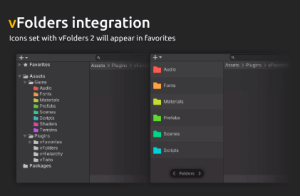
Integration with vFolders 2 – custom folder icons will appear in favorites
Performance improvements
Simple time saver
Bookmark the most important folders, assets and GameObjects and focus on the development instead of clicking all around the editor to find that one object
Minimal design
– Open vFavorites by holding Alt in project window
– Only visible when you need it, doesn’t waste UI space
Group favorites in pages
– Rename pages by clicking the name
– Smooth page switch animation
Navigate with arrow keys
– Up/Down to change selection
– Left/Right to change page
Select favorites instantly with number keys
– Press Alt-1 to select the first item
– Press Alt-2 to select the second item
– And so on
Integration with other Editor Enhancers
– Icons set with vHierarchy 2 will appear in favorites
– Icons set with vFolders 2 will appear in favorites