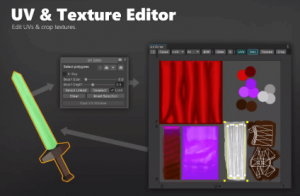
Move, Rotate and Scale UVs with ease. And while you are at it you can also move your texture pixels along. Finally crop the texture and you are done.
For more details about this asset: Click Here
This is a paid asset, but now you can download the “UV Editor & Texture Editor” for FREE. Please keep in mind that this package is provided only for learning purposes or to test before buying the product, NOT FOR COMMERCIAL PURPOSES.
UV Editor & Texture Editor v2.0.8 (18 Dec 2025) (Latest version)
UV Editor & Texture Editor v2.0.0
“Sharing is caring”
Description
Links: Manual
Move, Rotate and Scale UVs with ease. And while you are at it you can also move your texture pixels along. Finally crop the texture and you are done.
!! ⚠️ IMPORTANT ⚠️ !!
Version 2 pack a lot of significant updates. Please delete to old version of the tool BEFORE installing this new version.
???? This asset is also part of the Mesh Tools Bundle 2. ????
???? Easy to use
No need to do the cumbersone selection of many vertices. Simply paint on your mesh and all the painted triangles are selected.
???? UV Editing
Move, Rotate, Scale your UV howevery you like.
The non-destructive workflow ensures all your original assets (meshes, materials, textures) are left untouched. The tool will generate and assign new ones automatically under Assets/UVEditorAssets/.
???? Texture Editing
The texture editing mode allows you to move pixels within your texture based on the selected triangles. Very handy to clean up messy layouts. And once you are done you can use the crop feature or trim the fat. Easy.
???? Documentation
Check out https://kamgam.com/unity/UVEditorManual.pdf
✔️ Full Source Code
I publish this asset with full source code because as a developer I know how annoying it is to not have source code access. If you like it then please remind others to purchase the plugin. Don’t just copy and paste it everywhere. Thank you ❤️
✔️ Supports Unity 2021.3+, 2022, 2023, Unity 6, … LTS
It may work with earlier versions too but those are not tested anymore.
???? Read this before you buy ????
⚠️ This is an EDITOR ONLY tool. It does not have runtime support.
⚠️ This is NOT a UV mapper tool. The tool can be used to EDIT existing UV layouts (see video) BUT if your model does not have UVs yet and needs a proper layout then this most likely is not the tool for it.
⚠️ Unity 2021.3 or higher is required (LTS releases strongly recommended).
⚠️ It may be slow on meshes with > 60.000 vertices. If you run into performance issues then please set the UV Filter to “Selected” to limit the UV display to the selection only.
✍️ Usage
1) To to Tools/UV Editor (or use the tools side bar)
2) Open the UV Editing Window
3) Select your Object and UVs
4) Move, scale or rotate them.
5) Hit “Apply” at the bottom of the UV Editor window.
6) Done.
???? HINT 1:
Editing single vertices is possible. Just select on of the adjacent triangles, switch to vertex mode and then delselect the vertices you do not want to move.
???? HINT 2:
In crop mode notice that only the UVs that use the same texture are cropped.
???? HINT 3:
Undo / Redo works only if the UV Editor window is focused (blue highlight at the top).
☎️ Support
If you have any questions please write to office[at]kamgam.com. Please be patient, replies may take a few days. Please include your Asset Store Order Nr and the exact Unity version in your request. Please also try upgrading to the most recent LTS version before asking. Thank you.