Dev Asset Collection

All Things That You Need to Build A Video Game
Menu
  • 2D
    • Characters
    • Environments
    • Fonts
    • GUI
    • Textures & Materials
  • 3D
    • Animations
    • Characters
    • Environments
    • GUI
    • Props
    • Vegetation
    • Vehicles
  • Add-Ons
    • Machine Learning
    • Services
  • Audio
    • Ambient
    • Music
    • Sound FX
  • Essentials
    • Tutorial Projects
  • Templates
    • Packs
    • Systems
    • Tutorials
  • Tools
    • AI
    • Animation
    • Audio
    • Camera
    • Game Toolkits
    • GUI
    • Input Management
    • Integration
    • Level Design
    • Localization
    • Modeling
    • Network
    • Painting
    • Particles & Effects
    • Physics
    • Sprite Management
    • Terrain
    • Utilities
    • Version Control
    • Video
    • Visual Scripting
  • VFX
    • Particles
    • Shaders
Home
VFX
Shaders
TypeA AnimeShader – Dev Community

TypeA AnimeShader – Dev Community

Tsunami 15 July, 2020
Sending
User Rating 0 (0 votes)

For more detail this asset from the Unity Asset Store: Click Here

This is a paid asset, but we’ll share TypeA AnimeShader for FREE, Please keep in mind this package is provided only for learning purposes or to be able to test before buying the product, NOT FOR COMMERCIAL PURPOSES.[/v0lcano]

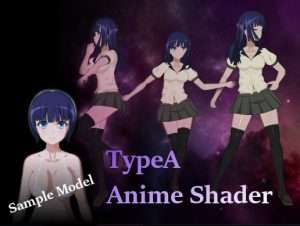
TypeA AnimeShader v1.0.1

Download Now

It is a shader which we started to create for animation style expression at VRC.
It can also be used for normal animation / illustration style expression.
Adjust with color space “linear”. (For VRChat)

It can correspond to various lighting by setting. For example, it is possible to express such as ignoring the light source although it is affected by brightness and color.

From v1.0.6, it is treated as the light source is in the brightest direction among all the light information that can be used in BasePass, in order to prevent the phenomenon that paint parts overlap multiple times.
In addition, it became possible to mix the view direction and the light direction, and to make things like “add the influence of lighting after making the view direction the main effect”.

Transparency of eyebrows and eyes using a stencil can be set separately from a completely transparent part and a translucent part.
In addition, shadows and highlights etc can be finely set in animation style.
Starting from v1.0.6, the highlight will appear at a position slightly closer to the light source relative to the front.

Please check screenshots and sites for details.

· This document translates to google

set contents
· 4 kinds of shaders
· 11 sample shaders when using VRC
· Sample model 1


Prev Article
Next Article

Related Articles

LSPP – Fast God Rays and Volumetric Lighting for URP – Dev Community
Tsunami 10 September, 2025

LSPP – Fast God Rays and Volumetric Lighting for URP – Dev Community

The Visual Engine | Integration for HTrace WSGI – Dev Community
Tsunami 1 April, 2026

The Visual Engine | Integration for HTrace WSGI – Dev Community

Linear Unlit Gradients – Dev Community
Tsunami 20 August, 2020

Linear Unlit Gradients – Dev Community

Winter Shader Pack – Dev Community
Tsunami 5 October, 2020

Winter Shader Pack – Dev Community

Leave a Reply Cancel Reply

Recent Posts

  • Squad Shooter | Template + Editor – Dev Community
  • UModeler X Plus – Dev Community
  • Legs Animator – Dev Community
  • Look Animator – Dev Community
  • Love/Hate – Dev Community

Dev Asset Collection

All Things That You Need to Build A Video Game
Copyright © 2026 Dev Asset Collection
Privacy Policy | Disclaimer | DMCA