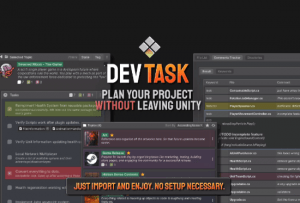
Introducing DevTask – the ultimate customizable project manager. With user-friendly custom inspectors, spend less time learning and just get down to making games.
For more details about this asset from the Unity Asset Store, please visit: Click Here
This is a paid asset, but now you can download the “DevTasks – Offline Project Manager” for FREE. Please note that this package is provided solely for learning purposes or to test the product before purchase, and not for commercial use.
DevTasks – Offline Project Manager v1.2.1a (05 Oct 2025) (Latest version)
“If possible, please buy the package to support the developer”
Description
Introducing DevTask – the ultimate customizable project manager. With user-friendly custom inspectors, spend less time learning and just get down to making games.
Just import and enjoy. There is no need to deal with third-party tools or annoying registration/logins. Everything is saved directly in your project as scriptable objects, giving you complete control. Now you do not need to risk losing focus by switching out of Unity.
The quick shortcut Control + Shift + T means you are always just a moment away from your tasks.
⭐DOCUMENTATION⭐
????Features????
(Due to character limitations, this contains a small portion of features. For a full list, please check our documentation by clicking here.)
✅ Easy Organization
Easily organize your tasks, goals, and milestones by topic, lists, and tasks. Add reminders and due dates that integrate into the Unity Application.
✅ References
You can use any Unity file, such as scenes, prefabs, scripts, and even folders, as a reference for your tasks.
✅ Code To-Do
We often see issues when writing code and leave a note for later. But unfortunately, forgetting about them and searching for each can be time-consuming.
Streamline code management by identifying, categorizing, and tracking these comments across your codebase, ensuring no critical tasks or reminders are overlooked.
The straightforward UI will give you a quick overview of every script you want. Waste less time and improve your productivity
✅ Analyze your entire project
Find empty folders, count textures, code files, namespaces, the number of codes & comments, and many more.
✅ Customization
Easily modify the look and feel of your topics/tasks by changing colors and icons.
✅ Adaptable Inspector
The entire asset is made with an adaptable UI system in the UI toolkit to switch on/off icons, labels, and other content to fit the size of the window you prefer.
✅ Offline
Work offline without any internet connection or cloud service. Everything is saved inside your project and just one click away
✅ Source code
Full source code included.
⭐Optional: This asset works great alongside DevTrails, a way to track your Unity usage privately.⭐
⭐ Some other assets that might interest you
→ Modular 3D Text – Easily create texts as 3D meshes and build a complete 3D UI system.
→ Better Transform – A must-have editor extension to improve your workflow.
→ Better Mesh – This is how the mesh filter inspector should have looked by default.
→ Modular To-do lists – The ultimate offline unity project management asset.
→ 3D Icons Mega Pack – A collection of 3D Icons perfect for your 3D in-game UI.
→ Modular 3D Ranks – Create professional-grade 3D Badges in no time with a powerful, user-friendly tool built for Unity developers of all levels.
Technical details
[Please note that Unity 2021 is not officially supported. A slightly older version will be downloaded if you are using that version.]
Each topic in the asset is a single file (Scriptable Object), so you can work offline without an internet connection or cloud service. This is most suitable for solo developers.
Requirement
The asset will automatically import Unity’s editor coroutines package on import.