Dev Asset Collection

All Things That You Need to Build A Video Game
Menu
  • 2D
    • Characters
    • Environments
    • Fonts
    • GUI
    • Textures & Materials
  • 3D
    • Animations
    • Characters
    • Environments
    • GUI
    • Props
    • Vegetation
    • Vehicles
  • Add-Ons
    • Machine Learning
    • Services
  • Audio
    • Ambient
    • Music
    • Sound FX
  • Essentials
    • Tutorial Projects
  • Templates
    • Packs
    • Systems
    • Tutorials
  • Tools
    • AI
    • Animation
    • Audio
    • Camera
    • Game Toolkits
    • GUI
    • Input Management
    • Integration
    • Level Design
    • Localization
    • Modeling
    • Network
    • Painting
    • Particles & Effects
    • Physics
    • Sprite Management
    • Terrain
    • Utilities
    • Version Control
    • Video
    • Visual Scripting
  • VFX
    • Particles
    • Shaders
Home
3D
Props
Garden Decorations – Dev Community

Garden Decorations – Dev Community

Tsunami 14 August, 2020
Sending
User Rating 5 (1 vote)

For more detail this asset from the Unity Asset Store: Click Here

Garden Decorations v1.3

Faster Download Download Now

“Sharing is caring”

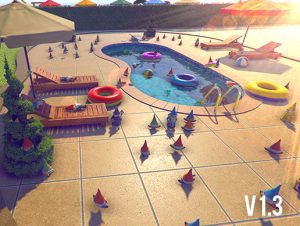
A collection of over 50 assets perfect for decorating your garden, park or backyard.

This pack contains:
– 7 hedges models
– 5 types of hedge shapes
– 2 types of arbor benches
– 10 types of flower beds (flowers not included)
– 2 types of statues.
– shed
– grill
– column

***Update 1.1
-4 garden gnome models ( with 7 material colors each for a total of 28 color variations).

***Update 1.2
– pool
– ladder
– diving board
– lounge chair
– umbrella
– swim ring
– beach ball
– paving rocks
– multiple materials variations

***Update 1.3
– added 4 new garden gnomes models ( with a total of 20 material variations)
– renamed previous gnome textures and material for a more consistent naming
– added a demo scene for an easier assets exploration.
*****NOTE
1. The water used in the preview images is the water from Unity: Assets ->Import Package-> Environment (Water)

2. For best visuals please use Linear color space: Edit ->Project Settings ->Player -> Other Settings ->Color Space (Linear)

For more info check the preview images or PM me.

Rate and feedback appreciated.
 

Prev Article
Next Article

Related Articles

Footwear Collection – Dev Community
Tsunami 16 July, 2020

Footwear Collection – Dev Community

Low Poly Racing Cars Pack – Dev Community
Tsunami 11 March, 2022

Low Poly Racing Cars Pack – Dev Community

Manager Office Interior – Dev Community
Tsunami 8 May, 2026

Manager Office Interior – Dev Community

Pizzeria Interior – Dev Community
Tsunami 12 February, 2026

Pizzeria Interior – Dev Community

Leave a Reply Cancel Reply

Recent Posts

  • Impact CFX – Collision Effects System – Dev Community
  • 3D Roguelike RPG Complete Kit for Mobile and PC: TPS, Enemy AI, Puzzle and Props – Dev Community
  • Adventure Creator – Dev Community
  • Lumen: Stylized Light FX 2 – Dev Community
  • OptiTerra (HDRP) – High Performance Terrain Shader – Free Download

Dev Asset Collection

All Things That You Need to Build A Video Game
Copyright © 2026 Dev Asset Collection
Privacy Policy | Disclaimer | DMCA