Dev Asset Collection

All Things That You Need to Build A Video Game
Menu
  • 2D
    • Characters
    • Environments
    • Fonts
    • GUI
    • Textures & Materials
  • 3D
    • Animations
    • Characters
    • Environments
    • GUI
    • Props
    • Vegetation
    • Vehicles
  • Add-Ons
    • Machine Learning
    • Services
  • Audio
    • Ambient
    • Music
    • Sound FX
  • Essentials
    • Tutorial Projects
  • Templates
    • Packs
    • Systems
    • Tutorials
  • Tools
    • AI
    • Animation
    • Audio
    • Camera
    • Game Toolkits
    • GUI
    • Input Management
    • Integration
    • Level Design
    • Localization
    • Modeling
    • Network
    • Painting
    • Particles & Effects
    • Physics
    • Sprite Management
    • Terrain
    • Utilities
    • Version Control
    • Video
    • Visual Scripting
  • VFX
    • Particles
    • Shaders
Home
Tools
Utilities
Advanced Builder – Dev Community

Advanced Builder – Dev Community

Tsunami 31 July, 2020
Sending
User Rating 0 (0 votes)

For more detail this asset from the Unity Asset Store: Click Here

Advanced Builder v1.3.4

Download Now

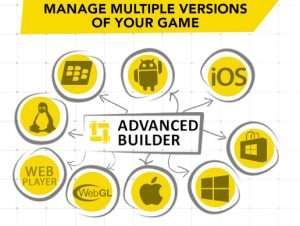
Advanced Builder provides an easy way to build in one click, multiple versions of your game on a lot of platforms.

For example, with one click, Advanced Builder will build a Demo and Paid version of your game on 4 different platforms (that’s 8 builds in one click).

Features
– Manage multiple versions of your game,
– Build on multiple platforms in one click,
– Switch in one click between multiple configurations to test your game in the Editor,
– Define a clean destination path for all your builds,
– Add your custom pre/post build script,
– Distribution platforms (to deal with Google Play, Amazon Store for example…),
– Use different scripting defines for each configuration,
– Choose the scenes you want to include in each configuration,
– Clean C# code.

Warning
– If you want to automatically build multiple version of your game with Advanced Builder, you will absolutely need Unity Pro or Unity 5 (because custom builds requires Unity Pro). BUT you can manually set a configuration via the ‘Project Configuration’ window. So you’ll have to click on a button to set the configuration you want, and then build manually every configuration.
– This tool does NOT allow you to build for iOS on a Windows/Linux machine. You need a Mac for that.

Continuously supported since January 2014!


Prev Article
Next Article

Related Articles

Startup Manager – Dev Community
Tsunami 25 December, 2023

Startup Manager – Dev Community

Character Customization – Dev Community
Tsunami 24 December, 2022

Character Customization – Dev Community

Physics Draw Mesh – Dev Community
Tsunami 16 August, 2022

Physics Draw Mesh – Dev Community

Impostor Graph – Dev Community
Tsunami 19 January, 2026

Impostor Graph – Dev Community

Leave a Reply Cancel Reply

Recent Posts

  • Squad Shooter | Template + Editor – Dev Community
  • Ultimate Selector – Dev Community
  • R.A.M 3 – River Auto Material 3 – Dev Community
  • UModeler X Plus – Dev Community
  • Legs Animator – Dev Community

Dev Asset Collection

All Things That You Need to Build A Video Game
Copyright © 2026 Dev Asset Collection
Privacy Policy | Disclaimer | DMCA