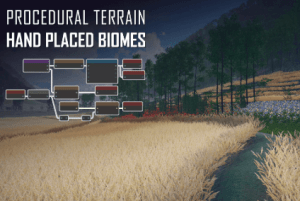
Graph based procedural terrain generator. Build each biome in a graph, place them by hand like a layered terrain system, and blend seamlessly with full control over transitions.
For more details about this asset: Click Here
This is a paid asset, but now you can download the “Vista Pro – Procedural Terrain Editor, Multi-Layer Biomes” for FREE. Please note that this package is provided solely for learning purposes or to test the product before purchase, and not for commercial use.
Vista Pro – Procedural Terrain Editor, Multi-Layer Biomes v2024.4.3
“If possible, please buy the package to support the developer”
Description
Vista Pro is a graph based procedural terrain generator built for intentional, artist directed terrain production. You decide where each biome sits in the scene, how large it is, and how it blends with its surroundings. Biomes work like layers in a layered terrain system: stack them, configure blend modes, and Vista resolves the transitions.
Other tools distribute biomes through noise and abstract rules, producing repetitive, generic results. Vista puts those decisions in the artist’s hands.
As a procedural terrain generator, Vista works at the biome level. Each biome has its own graph where you define height, textures, vegetation, and custom data. To add geological believability, run natural simulations such as erosion, water flow, landslide, and snow. The result is landform detail that would take hours to hand sculpt.
WORKFLOW
From there, a typical workflow looks like this:
Add terrains to the scene.
Add a base biome covering the whole scene and build its graph.
Drop regional biomes into specific areas.
Vista blends everything into the final result.
Modify biomes and regenerate at runtime if your game needs it.
PRO EDITION
Splines, real world data, and expose property are Pro exclusive. Everything in Vista Personal and Vista Indie is also included. Compare editions
Splines: Draw curves in the scene to shape roads, rivers, and trails. Height conforms, textures paint, and vegetation clears along any path.
Real World Data: Start from real elevation and satellite imagery instead of blank terrain. Browse, download, and import data from real locations directly into the graph.
Expose Property: Surface graph parameters in the inspector so level designers and runtime systems can adjust terrain without opening the graph.
Technical details
FEATURES
Graph editor: Build procedural terrain logic by connecting nodes. Output height, textures, vegetation, and custom data from a single graph instead of stacking manual edits.
Local biomes: Place biome regions by hand in the scene, similar to how layers work in a layered terrain system. Overlap them, configure blend modes, and Vista resolves the transitions into the final terrain.
Multi terrain: Drive multiple terrain tiles from one graph with no seams between tiles.
Natural simulations: Run hydraulic erosion, thermal erosion, water flow, landslide, snow, and crack nodes to build landform complexity that would be impractical to hand sculpt.
Hex map: Generate terrain layouts built on hexagonal grids with biome support.
Runtime generation: Generate or update terrain at runtime, not just in the editor.
GPU acceleration: Terrain generation runs on the GPU, keeping iteration fast even on complex graphs.
Indie and Pro:
Hand painting: Paint biome masks in scene view and paint mask or color data inside the graph for quick manual adjustments.
Productivity tools: Work with subgraphs, smart search, anchor nodes, sticky images, and drag to reconnect so graphs stay manageable as projects grow.
MicroSplat integration: Sync texture arrays and terrain FX maps with MicroSplat for advanced texture and shader workflows.
Nav mesh utilities: Generate helper meshes from terrain data for navigation baking.
Pro only:
Splines: Draw spline paths in the scene. Conform height, paint textures, and clear vegetation along any path. Use for roads, rivers, and trails.
Real World Data: Browse and import real elevation data and satellite imagery from USGS, OpenTopography, and similar sources. Start from a real location instead of blank terrain.
Expose Property: Surface graph parameters in the Unity inspector so level designers and runtime systems can adjust terrain without opening the graph.
COMPATIBILITY
Supports Unity Terrain and Polaris Terrain with equivalent workflow coverage for both.
Compatible with Built in RP, Universal RP, and HDRP.
REQUIREMENTS
Unity 2021.3 LTS and above.
Compute shader support required.
Package dependencies (auto-installed): com.unity.searcher, com.unity.editorcoroutines, com.unity.mathematics
PLATFORMS
Editor: Supported on Windows and Mac. Terrain baked in the editor can be deployed to any platform Unity supports.
Runtime generation: Requires compute shader support. Supported on Windows (DirectX 12, DirectX 11, Vulkan) and Mac (Metal). Other platforms are not supported for runtime generation.
LIMITATIONS
Vista generates terrain for defined biome areas placed in the scene. Projects requiring infinite on-demand terrain streaming as the player moves are outside the intended scope.