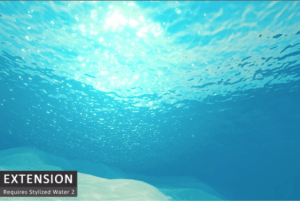
Extends the Stylized Water 2 shader asset with underwater rendering, by seamlessly blending the water with post processing effects.
For more details about this asset: Click Here
This is a paid asset, but now you can download Underwater Rendering for Stylized Water 2 (Extension) for FREE, Please keep in mind this package is provided only for learning purposes or to be able to test before buying the product, NOT FOR COMMERCIAL PURPOSES.
Underwater Rendering for Stylized Water 2 (Extension) v1.2.8 (Latest version)
Underwater Rendering for Stylized Water 2 (Extension) v1.0.9
Underwater Rendering for Stylized Water 2 (Extension) v1.0.8
Underwater Rendering for Stylized Water 2 (Extension) v1.0.5
Underwater Rendering for Stylized Water 2 (Extension) v1.0.4
(Tested with Unity version 2020.3.23f1)
Underwater Rendering for Stylized Water 2 v1.0.0
“Sharing is caring”
Extends the Stylized Water 2 shader asset with underwater rendering, by seamlessly blending the water with post processing effects.
? REQUIRES THE STYLIZED WATER 2 (v1.1.5+) ASSET TO BE INSTALLED!
Before purchasing, you must acknowledge this (see section above)
? Documentation ⚙️ Compatibilty ? Forum Thread
Draws a waterline lens effect for partially submerged camera’s. Unlike in many games, it won’t be required to snap the camera to sit either above or below the water, or resort to other tricks.
? Features:
• Underwater fog based on the water’s deep/shallow colors. Option to use volumes to blend settings.
• Waterline rendering for partially submerged cameras (supports split screen)
• Scene lighting is translated into the underwater fog, including sub-surface scattering. Reacts to dynamic directional and ambient lighting.
• Caustics rendering on geometry. Directional projection option.
• Underwater blurring and distortion
• Underside of the water is correctly shaded, to seamlessly match.
• Includes sub-graphs to add underwater fog support for transparent Shader Graphs
• Scalable performance, features can be limited on the render feature
? Limitations:
• Not compatible with VR or overlay camera’s
• Not suitable for mobile devices
• Designed for oceans, lakes and ponds. Dioramas or aquariums aren’t possible.
• Can’t mask underwater (eg. submarine windows)
• Not a volumetric fog/light solution, but rather depth-based.
• Requires a single water level (incompatible with rivers/planets)
[ Refund policy ] Refunds cannot be granted for not having read the sections on this page
Imports directly into the StylizedWater2 folder (wherever it is located)
Fog is not compatible with MSAA, because MSAA does not apply to the depth texture.
Executes before transparent materials, so they will not appear to be affected by fog. Includes a subgraph for getting the water density and underwater mask, this can be used to fade out a custom transparent material into the water fog.
Third party fog effects will still apply to the underwater environment. As long as the underwater fog is denser, this won’t be noticeable.
Looks best when reflections and refractions are enabled on the water material
Performance and feature limiting options are exposed on the render feature, so can be used for multiple quality levels
Using the combination of HDR, Tonemapping and the Gamma color-space will not guarantee the underwater fog matches the water perfectly (Linear color-space should be used).
Waterline will always render when the camera goes below the water level. The static UnderwaterRenderer.EnableRendering boolean should be disabled in your game logic to handle such cases.
Fog needs geometry to work with, an empty scene/void underneath the water naturally results in a single-color fog appearance.
Note: not compatible with Atmospheric Height Fog, Curved World 2020 or WaveMaker