Dev Asset Collection

All Things That You Need to Build A Video Game
Menu
  • 2D
    • Characters
    • Environments
    • Fonts
    • GUI
    • Textures & Materials
  • 3D
    • Animations
    • Characters
    • Environments
    • GUI
    • Props
    • Vegetation
    • Vehicles
  • Add-Ons
    • Machine Learning
    • Services
  • Audio
    • Ambient
    • Music
    • Sound FX
  • Essentials
    • Tutorial Projects
  • Templates
    • Packs
    • Systems
    • Tutorials
  • Tools
    • AI
    • Animation
    • Audio
    • Camera
    • Game Toolkits
    • GUI
    • Input Management
    • Integration
    • Level Design
    • Localization
    • Modeling
    • Network
    • Painting
    • Particles & Effects
    • Physics
    • Sprite Management
    • Terrain
    • Utilities
    • Version Control
    • Video
    • Visual Scripting
  • VFX
    • Particles
    • Shaders
Home
Tools
Utilities
Pro Material Combiner – Dev Community

Pro Material Combiner – Dev Community

Tsunami 16 July, 2020
Sending
User Rating 0 (0 votes)

For more detail this asset from the Unity Asset Store: Click Here

This is a paid asset, but we’ll share Pro Material Combiner for FREE, Please keep in mind this package is provided only for learning purposes or to be able to test before buying the product, NOT FOR COMMERCIAL PURPOSES.[/v0lcano]

Pro Material Combiner v1.3

Download Now

This is ProMaterial Combiner. (it does exactly the same that ProMaterialCombiner++ does).
ProMaterialCombiner++ includes:
– Source code.
– Reuse textures to make atlases smaller.
– Batch mode: Combine several objects materials.

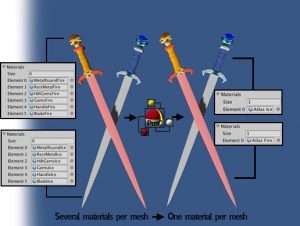
ProMaterial Combiner is an editor extension that will combine materials with 1 click. Quick and easy.

Custom shaders?, no worries; the tool works with any shader.
NOTE: If your UVs are outside [0,0-1,1] and you are using textures your combined material will look wrong; make sure your UVs are inside [0,0-1,1] for your objects
NOTES: – UNITY 5, 2018, 2019, 2020+ supported.
– Easy, Just select your object and click combine.
– No scripting required.
– Meshes automatically set up and adjusted.
– Supports any shader (detected automatically).
– Full lightmapping support.
– Your source assets will not be touched.
– Works with colored and textured materials.
– Supports tiled materials.
– Generate prefabs from the combined object.
– Supports skinned mesh renderers.
– Malformed UVs on colored-only materials are organized automatically.

NOTE: In order to combine materials all shaders have to be the same type.
Forum post


Prev Article
Next Article

Related Articles

Session Restore – Dev Community
Tsunami 16 February, 2025

Session Restore – Dev Community

Mirage – Versatile Impostor System – Dev Community
Tsunami 5 September, 2025

Mirage – Versatile Impostor System – Dev Community

Transform Tools – Dev Community
Tsunami 21 November, 2024

Transform Tools – Dev Community

Shaders Limiter – Dev Community
Tsunami 3 September, 2025

Shaders Limiter – Dev Community

Leave a Reply Cancel Reply

Recent Posts

  • Dog Chaos – Complete Mobile Game Template – Dev Community
  • Legendary Caves & Dungeons – Dev Community
  • MIGHTY TRACKING – Dev Community
  • Enemy Shooter AI for Playmaker – Dev Community
  • Garage Props Collection HQ – Dev Community

Dev Asset Collection

All Things That You Need to Build A Video Game
Copyright © 2026 Dev Asset Collection
Privacy Policy | Disclaimer | DMCA