Dev Asset Collection

All Things That You Need to Build A Video Game
Menu
  • 2D
    • Characters
    • Environments
    • Fonts
    • GUI
    • Textures & Materials
  • 3D
    • Animations
    • Characters
    • Environments
    • GUI
    • Props
    • Vegetation
    • Vehicles
  • Add-Ons
    • Machine Learning
    • Services
  • Audio
    • Ambient
    • Music
    • Sound FX
  • Essentials
    • Tutorial Projects
  • Templates
    • Packs
    • Systems
    • Tutorials
  • Tools
    • AI
    • Animation
    • Audio
    • Camera
    • Game Toolkits
    • GUI
    • Input Management
    • Integration
    • Level Design
    • Localization
    • Modeling
    • Network
    • Painting
    • Particles & Effects
    • Physics
    • Sprite Management
    • Terrain
    • Utilities
    • Version Control
    • Video
    • Visual Scripting
  • VFX
    • Particles
    • Shaders
Home
Tools
Utilities
Pro Draw Call Optimizer – Dev Community

Pro Draw Call Optimizer – Dev Community

Tsunami 15 July, 2020
Sending
User Rating 0 (0 votes)

For more detail this asset from the Unity Asset Store: Click Here

This is a paid asset, but we’ll share Pro Draw Call Optimizer for FREE, Please keep in mind this package is provided only for learning purposes or to be able to test before buying the product, NOT FOR COMMERCIAL PURPOSES.[/v0lcano]

Pro Draw Call Optimizer v4.3.5

Faster Download Download Now

“Sharing is caring”

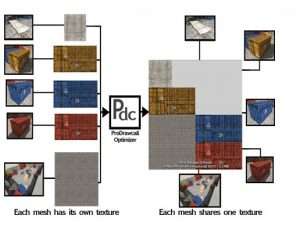
Pro draw call is an editor extension that will easily reduce your draw calls by creating atlases for your models so they can share materials for static/dynamic batching.

Custom shaders?, no worries, the tool automatically recognizes any shader that uses textures.

Supports Unity 5, 2017, 2018, 2019+!
NOTES:
– Easy, 2 clicks and have your scene optimized
– No scripting required.
– Meshes automatically set up and adjusted.
– Full lightmapping support.
– Your source assets will not be touched.
– Full multiple material per game object support.
– Full support for tiled materials.
– Examples included for you to see and play.
– Quick and easy object search by tag or layer.
– Option to create prefabs for the generated objects.

Still not sure? Just download the light version that can be found here, give it a try and see if it suits your needs.

ProDrawCall will not work with UVs outside of [0,0-1,1]
For multiple material GameObjects all the materials have to have the same type of shader.
For more detailed info you can check these links:
-Video how the tool works
-Video on how to easily set up your assets
-Video on how to quickly solve problems
-Video on how to work with LOD groups

 

Prev Article
Next Article

Related Articles

vFavorites 2 – Dev Community
Tsunami 20 March, 2026

vFavorites 2 – Dev Community

Project Planner – Dev Community
Tsunami 5 September, 2020

Project Planner – Dev Community

Simple Mesh Combine – Dev Community
Tsunami 20 July, 2020

Simple Mesh Combine – Dev Community

Impostor Graph – Dev Community
Tsunami 19 January, 2026

Impostor Graph – Dev Community

Leave a Reply Cancel Reply

Recent Posts

  • Squad Shooter | Template + Editor – Dev Community
  • Ultimate Selector – Dev Community
  • R.A.M 3 – River Auto Material 3 – Dev Community
  • UModeler X Plus – Dev Community
  • Legs Animator – Dev Community

Dev Asset Collection

All Things That You Need to Build A Video Game
Copyright © 2026 Dev Asset Collection
Privacy Policy | Disclaimer | DMCA