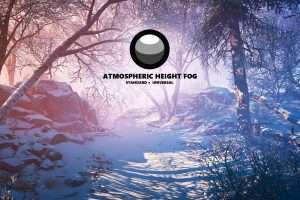
Simple yet beautiful height fog with directional light and animated noise support. Height fog will provide a volumetric like effect while using a lower computation power! Built with Amplify Shader Editor, all shaders can be modified with ease to your needs.
For more details about this asset: Click Here
This is a paid asset, but now you can download Atmospheric Height Fog • Optimized Fog Shaders for Consoles, Mobile and VR for FREE, Please keep in mind this package is provided only for learning purposes or to be able to test before buying the product, NOT FOR COMMERCIAL PURPOSES.
Atmospheric Height Fog | Optimized Fog for Consoles, Mobile and VR v3.8.0 (15 Dec 2025) (Latest version)
Atmospheric Height Fog | Optimized Fog for Consoles, Mobile and VR v3.7.0 (01 Nov 2025)
Atmospheric Height Fog • Optimized Fog Shaders for Consoles, Mobile and VR v3.7.0 (09 Sep 2025)
Atmospheric Height Fog • Optimized Fog Shaders for Consoles, Mobile and VR v3.6.0
Atmospheric Height Fog • Optimized Fog Shaders for Consoles, Mobile and VR v3.5.0
“Sharing is caring”
IMPORTANT
Due to multiple depth rendering issues, the fog will not work on Android devices with URP 7.2.0 or higher (Unity bug)! Depth Texture and one of the following URP features need to be enabled for the depth to work properly: Opaque Texture, HDR, MSAA, Post Processing, or Render Scale set higher or lower than 1. URP 7.4.1 is working as expected and recommended for development!
WELCOME
All asset-related discussions are moving to Discord. Join us for more info, updates, if you experience any issues or if you just want to say hi!
Read the Description / Limitations sections before buying the asset!
Read the Howto / First Steps section to get started or to update the asset!
Read the Verified section for tested platforms, pipelines and VR support!
Read the Changelog for new featues, improvements and known issues!
OVERVIEW
COMPATIBILITY
● Standard Render Pipeline
● Universal Render Pipeline 7.1.8+
● Amplify Shader Editor
FEATURES
● Easy to set up
● Distance-based fog
● Height based fog
● Directional light fog
● Fog Axis Selection
● 3D animated noise support
● Volumes blending support
● Fog Presets support
● Per Object Transparency support (Experimental, will work for most unity built-in transparent shaders or custom shaders via the Custom Fog Material support)
● Apply Height Fog function, usable to add fog support for transparent shaders made with Amplify Shader Editor
● UI Default shader with Height Fog support, when the UI is used in World Space Canvas
● VR Support
● Forward and Deferred support
● Perspective and Orthographic support
● Scene view visibility support
● Basic demo scene included
LIMITATIONS
● SM2 devices are not supported
● Only higher-end mobile devices are recommended
● This is not a true volumetric fog solution
● This fog requires depth rendering capable devices
● High Definition Render Pipeline is not supported
● Transparent objects can cause visual artifacts because they don’t write to the depth buffer
● Due to multiple depth rendering issues, the fog will not work on Android devices with URP 7.2.0 or higher (Unity bug)! Depth Texture and one of the following URP features need to be enabled for the depth to work properly: Opaque Texture, HDR, MSAA, Post Processing, or Render Scale set higher or lower than 1.
● Due to Depth rendering being broken on Oculus Quest with Multiview on Standard render pipeline, the fog will not work properly. Multi-Pass can be used instead.
MORE ASSETS
● The Vegetation Engine • Unified wind shaders for any vegetation
● Polyverse Wind • Wind shaders compatible with any low poly assets
● Polyverse Skies • Low poly skybox shaders and textures
● Free Skybox Shader • Cubemap extended Shader
Looking for a quick reply to your questions? Join us on our Discord server!