This is a paid asset, but now you can download 2D Item Drop for the uMMORPG 2D for FREE, Please keep in mind this package is provided only for learning purposes or to be able to test before buying the product, NOT FOR COMMERCIAL PURPOSES.
For more details about this asset: Click Here
2D Item Drop for the uMMORPG 2D v2.0.1
“Sharing is caring”
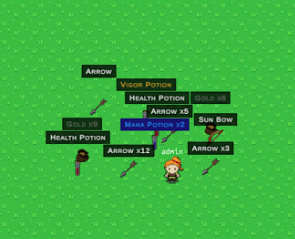
Item Drop 2D has been designed as an addon for uMMORPG 2D, which means that uMMORPG 2D is required and must be installed first. Item Drop 2D allows you to drop items on the ground and modifies the way monsters drop loot to be individual items on the ground that can be picked up.
(Documentation) (Changelog)
Please read these documents carefully before you download this asset.
Requires:
uMMORPG 2D 1.63 or uMMORPG 2D Remastered 2.6 and TextMesh Pro.
Compatible with:
Management Tools for the uMMORPG.
You can drop items from the inventory and equipment by just drag an item and drop it on the ground.
Item name color based on the rarity of the item. There are three levels of item rarity: Basic, Rare and Unique.
Loot will be dropped on the ground in a small distance, randomly around a killed monster.
Item linking. Each player can link an item into chat. The item name will be visible in the message in color based on the rarity of the item. Hover the cursor over a linked item to see an instant pop up box showing information about it.
Only 2 draw calls for all item labels on the screen.
Version 2.0.0 comes with the Setup Wizard. Now you can install everything in a quick and easy way. A few clicks to install the entire addon or uninstall as needed. Just click a button to replace or add code, components and prefabs. However, if you have previously made any changes that can conflict with the installer you must install this addon manually.
Go to the documentation to find out information about all of the features.