Dev Asset Collection

All Things That You Need to Build A Video Game
Menu
  • 2D
    • Characters
    • Environments
    • Fonts
    • GUI
    • Textures & Materials
  • 3D
    • Animations
    • Characters
    • Environments
    • GUI
    • Props
    • Vegetation
    • Vehicles
  • Add-Ons
    • Machine Learning
    • Services
  • Audio
    • Ambient
    • Music
    • Sound FX
  • Essentials
    • Tutorial Projects
  • Templates
    • Packs
    • Systems
    • Tutorials
  • Tools
    • AI
    • Animation
    • Audio
    • Camera
    • Game Toolkits
    • GUI
    • Input Management
    • Integration
    • Level Design
    • Localization
    • Modeling
    • Network
    • Painting
    • Particles & Effects
    • Physics
    • Sprite Management
    • Terrain
    • Utilities
    • Version Control
    • Video
    • Visual Scripting
  • VFX
    • Particles
    • Shaders
Home
Tools
GUI
Simple Color Picker [PRO] – Dev Community

Simple Color Picker [PRO] – Dev Community

Tsunami 16 July, 2020
Sending
User Rating 5 (1 vote)

For more detail this asset from the Unity Asset Store: Click Here

This is a paid asset, but we’ll share Simple Color Picker [PRO] for FREE, Please keep in mind this package is provided only for learning purposes or to be able to test before buying the product, NOT FOR COMMERCIAL PURPOSES.[/v0lcano]

Simple Color Picker [PRO] v1.2

Download Now

Welcome! Hope you will enjoy working with my asset!

I’ve created this asset for my app Pixel Studio, so you can try it using the link.

Features:
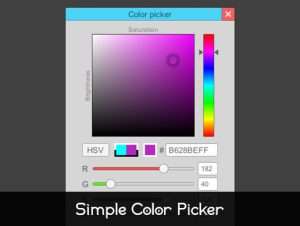
● RGBA/HSV switch
● Color sliders
● Color component input fields
● Hex color input field
● Color comparator and transparency view
● Clean and simple C# code
● No shaders and materials used
● Unity 5, 2017, 2018 support
● Unity uGUI
● Any platform (Standalone, Android, iOS, WebGL)

Usage:
● Open and run Scene
● Click any point in working field (Saturation/Brightness) to pick color
● Set hue level using Hue slider (vertical rainbow slider)
● Use RGB/HSV button to switch mode
● Change RGBA or HSV sliders to change color
● You can set RGBA and HSV values with input fields
● You can set hex color value with HEX field (#)
● Press Select button to select color
● Press Review button to write a review and make me happy =)

Support:
● [email protected]

It would be super awesome if you will rate ★★★★★ my asset and leave your feedback!


Prev Article
Next Article

Related Articles

Dark – Complete Grunge UI – Dev Community
Tsunami 3 September, 2020

Dark – Complete Grunge UI – Dev Community

Unity Camera Assistant – Dev Community
Tsunami 4 May, 2021

Unity Camera Assistant – Dev Community

Quests (Game Creator 1) – Dev Community
Tsunami 14 July, 2020

Quests (Game Creator 1) – Dev Community

Speech Bubble Manager – Dev Community
Tsunami 26 May, 2023

Speech Bubble Manager – Dev Community

Leave a Reply Cancel Reply

Recent Posts

  • Dog Chaos – Complete Mobile Game Template – Dev Community
  • Legendary Caves & Dungeons – Dev Community
  • MIGHTY TRACKING – Dev Community
  • Enemy Shooter AI for Playmaker – Dev Community
  • Garage Props Collection HQ – Dev Community

Dev Asset Collection

All Things That You Need to Build A Video Game
Copyright © 2026 Dev Asset Collection
Privacy Policy | Disclaimer | DMCA