Dev Asset Collection

All Things That You Need to Build A Video Game
Menu
  • 2D
    • Characters
    • Environments
    • Fonts
    • GUI
    • Textures & Materials
  • 3D
    • Animations
    • Characters
    • Environments
    • GUI
    • Props
    • Vegetation
    • Vehicles
  • Add-Ons
    • Machine Learning
    • Services
  • Audio
    • Ambient
    • Music
    • Sound FX
  • Essentials
    • Tutorial Projects
  • Templates
    • Packs
    • Systems
    • Tutorials
  • Tools
    • AI
    • Animation
    • Audio
    • Camera
    • Game Toolkits
    • GUI
    • Input Management
    • Integration
    • Level Design
    • Localization
    • Modeling
    • Network
    • Painting
    • Particles & Effects
    • Physics
    • Sprite Management
    • Terrain
    • Utilities
    • Version Control
    • Video
    • Visual Scripting
  • VFX
    • Particles
    • Shaders
Home
3D
Animations
Retro Horror Template – Guided Actions – Free Download

Retro Horror Template – Guided Actions – Free Download

Tsunami 9 August, 2026
Sending
User Rating 0 (0 votes)

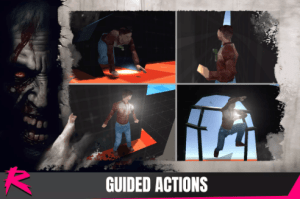
This addon includes the required code and 4 samples of guided player actions: Ledge walk, Crawling, Narrow Gap, Window Jump.

For more details about this asset: Click Here

This package is provided solely for evaluation, learning, or testing purposes before purchase and is not permitted for commercial use.

Retro Horror Template – Guided Actions v1.0 (Latest version)

VIP Only

“If possible, please buy the package to support the developer”

Description
This addon includes the required code and 4 samples of guided player actions:

Ledge walk
Crawling
Narrow Gap
Window Jump
The guided actions follow a linear path, and forking is not supported.

The guided actions movement can be performed automatically or by input (using the primary movement axis).

Initial set up
To allow your player to perform GuidedActions simply add a new state called GuidedAction inside your character prefab.

Add the component PlayerStateGuidedAction too this object and assign the Motion state to the ExitState variable. Optionally, tick AutoBlendToNewCamera inside CameraLockedInput, which will slowly convert the input to the new direction when a fixed camera change happens (by default it locks to the previous camera until a substantial change happens)

Playing the example scenes
For simplicity-sake, we recommend to make the aforementioned state change to the default character located in HorrorEngine/Prefabs/Character.

If you didn’t make the state change on the default character prefab. Make sure you use the correct HECoreAssets using the modified character in all the sample scenes.
Get paid unity asset for free
Prev Article

Related Articles

Walking Motions Pack 1 – Free Download
Tsunami 13 November, 2023

Walking Motions Pack 1 – Free Download

Stylish Archer Assets Pack – Free Download
Tsunami 3 June, 2024

Stylish Archer Assets Pack – Free Download

Combat animations – Kickboxing and Muay Thai V1 – Free Download
Tsunami 19 February, 2024

Combat animations – Kickboxing and Muay Thai V1 – Free Download

Sword and Shield Animations – Free Download
Tsunami 3 March, 2024

Sword and Shield Animations – Free Download

Leave a Reply Cancel Reply

Recent Posts

  • Retro Sci-Fi Research Cabin Environment – Free Download
  • Interactable Computers – Free Download
  • Retro Horror Template – Guided Actions – Free Download
  • Retro Horror Template – Weapon Pack 1 – Free Download
  • Spark – Game Creation Framework – Free Download

Dev Asset Collection

All Things That You Need to Build A Video Game
Copyright © 2026 Dev Asset Collection
Privacy Policy | Disclaimer | DMCA