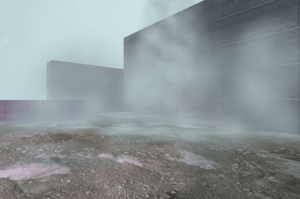
Realistic Fog FX is a pack of billboard particle effects designed for both realistic and stylized environments, and can quickly add extra atmosphere to your scene.
For more details about this asset from the Unity Asset Store, please visit: Click Here
This is a paid asset, but now you can download the “Realistic Fog FX” for FREE. Please note that this package is provided solely for learning purposes or to test the product before purchase, and not for commercial use.
Realistic Fog FX v1.0.1 (23 Dec 2025) (Latest version)
“If possible, please buy the package to support the developer”
Description
Realistic Fog FX features 3 types of fog effect prefabs in two styles which can easily be dragged & dropped into your scene.
✅ Built-in ✅ URP ✅ HDRP
WebGL Demo (Built-in)
The custom shader lets the fog blend in with the environment, as well as fades out the billboards slowly depending on the camera distance to avoid billboard textures popping in/out.
The effect can be scaled through by changing the Start Size and Radius in the particle system. The fog color is easily tinted via Vertex Color in the particle systems, or directly via the custom shader.
The asset also includes a bonus dust particle system, smoke puff effect and a smoke trail effect.
Technical details
This asset includes:
3 particle system prefabs in two styles
4 bonus particle systems
1 custom shader
Upgrade packages for URP and HDRP
The fog effect uses one simple texture at 1024×1024, with an alternate style version using a 8×8 spritesheet.
Prefabs included:
Horizontal billboard effect that works well against flat surfaces
Mixed horizontal & vertical billboards
Falling fog billboards
Bonus prefabs:
Smoke puff (2x)
Smoke trail
Floating dust effect
Custom shader:
With Soft Particles or Depth Texture (depending on SRP) enabled in your project, the custom shader lets you fade particles towards geometry such as walls and floors in your scene.
The shader also allows you to fade the billoards out as the Camera moves through them to avoid clipping artifacts (billboards popping in).
The custom shader also allows particles to fade properly with Scene Fog (in Lighting settings).