Ready to use Objective Manager and Quest Engine System. You can create all your objectives and quests for your any kind of Pc, Console or Mobile games and add them to your Game Design easily.
For more details about this asset: Click Here
This is a paid asset, but now you can download the “Objective Manager and Quest Engine” for FREE. Please keep in mind that this package is provided only for learning purposes or to test before buying the product, NOT FOR COMMERCIAL PURPOSES.
Objective Manager and Quest Engine v1.1
“Sharing is caring”
Description
Ready to use Objective Manager and Quest Engine Package for Unity. You can create all your objectives and quests for your any kind of Pc, Console or Mobile games and add them to Objective Manager easily.
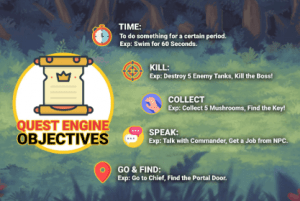
The package is very easy to use and it supports 5 different type of Objectives:
Time: To do something for a certain of period. (Example: Don’t die for 30 Seconds, Swim for 60 Seconds, etc…)
Kill: To destroy or kill something a certain number of times. (Example: Kill 10 Enemy Soldiers, Hunt 10 Animals, Destroy 5 Enemy Tanks, etc…)
Collect: To collect something for a certain amount (Example: Collect 30 Magical Mushroom, Find and Collect 5 Keys, Collect the missing parts of puzzle, etc…)
Go: To go somewhere or move to specific position. (Example: Go to Chief, Find the Mystical Portal, Go to Lobby, Find the Hostages, etc…)
Speak: To speak with target and have dialogue with it. (Example: Go to Seller and talk with him, etc…)
The package has got also extra features such as:
Show Waypoint Marker: If you activate this feature for an objective, an arrow will direct you to the target’s position on your camera while the player is on this objective.
Dialogue System: The package has got embedded dialogue system. So, the target can have multiple dialogues with the player.
Events to Trigger when Objective is Done: You can assign any kind of Unity Event or set GameObject name and Method name for Objectives. So, if player completes an objective, this specific GameObject will be found and Event will be invoked automatically.
Objective Flow Types: There are two types of Objective Flows in the Package. These are “One By One in Sequence” and “Multiple in Parallel”. So you can determine the objective flow in your game.
Technical details
Ready to use Objective Manager and Quest Engine Package for Unity. You can create all your objectives and quests for your any kind of Pc, Console or Mobile games and add them to Objective Manager easily.
The package is very easy to use and it supports 5 different type of Objectives:
Time: To do something for a certain of period. (Example: Don’t die for 30 Seconds, Swim for 60 Seconds, etc…)
Kill: To destroy or kill something a certain number of times. (Example: Kill 10 Enemy Soldiers, Hunt 10 Animals, Destroy 5 Enemy Tanks, etc…)
Collect: To collect something for a certain amount (Example: Collect 30 Magical Mushroom, Find and Collect 5 Keys, Collect the missing parts of puzzle, etc…)
Go: To go somewhere or move to specific position. (Example: Go to Chief, Find the Mystical Portal, Go to Lobby, Find the Hostages, etc…)
Speak: To speak with target and have dialogue with it. (Example: Go to Seller and talk with him, etc…)
The package has got also extra features such as:
Show Waypoint Marker: If you activate this feature for an objective, an arrow will direct you to the target’s position on your camera while the player is on this objective.
Dialogue System: The package has got embedded dialogue system. So, the target can have multiple dialogues with the player.
Events to Trigger when Objective is Done: You can assign any kind of Unity Event or set GameObject name and Method name for Objectives. So, if player completes an objective, this specific GameObject will be found and Event will be invoked automatically.
Objective Flow Types: There are two types of Objective Flows in the Package. These are “One By One in Sequence” and “Multiple in Parallel”. So you can determine the objective flow in your game.