Dev Asset Collection

All Things That You Need to Build A Video Game
Menu
  • 2D
    • Characters
    • Environments
    • Fonts
    • GUI
    • Textures & Materials
  • 3D
    • Animations
    • Characters
    • Environments
    • GUI
    • Props
    • Vegetation
    • Vehicles
  • Add-Ons
    • Machine Learning
    • Services
  • Audio
    • Ambient
    • Music
    • Sound FX
  • Essentials
    • Tutorial Projects
  • Templates
    • Packs
    • Systems
    • Tutorials
  • Tools
    • AI
    • Animation
    • Audio
    • Camera
    • Game Toolkits
    • GUI
    • Input Management
    • Integration
    • Level Design
    • Localization
    • Modeling
    • Network
    • Painting
    • Particles & Effects
    • Physics
    • Sprite Management
    • Terrain
    • Utilities
    • Version Control
    • Video
    • Visual Scripting
  • VFX
    • Particles
    • Shaders
Home
Tools
Physics
MS Move Objects – Dev Community

MS Move Objects – Dev Community

Tsunami 1 August, 2025
Sending
User Rating 0 (0 votes)

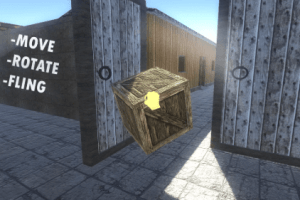
This system aims to move objects with the movement of the mouse, in addition to being able to rotate and launch objects.

MS Move Objects v2.4.7

Faster Download Download Now

“Sharing is caring”

This system aims to move objects with the movement of the mouse, in addition to being able to rotate and launch objects.

The system is developed for first person characters.

GENERAL FEATURES:
• You can choose between various motion types, such as AddForce, Velocity or Position. In this way, the system can easily adapt to all project types.
• The system works well with components like “HingeJoint”, “CharacterJoint”, “ConfigurableJoint”, among others.
• You can choose to detect the objects by tag, name or PhysicsMaterial.
• The system includes several variables allowing to configure the speed of the movement, speed of rotation, distance, force with which the object can be launched, among other options.
• All variables have an explanation through ‘Tooltip’ to facilitate the use of the script. To view the explanation, just rest your mouse over the desired variable, and the text will appear.
• The script also has a texture system, where a texture appears when the object can be moved, and another texture appears while the player is moving the object. This way, it is easier to use the system when the mouse is not visible.
• The system has an example scene, already configured, where the system is demonstrated in a simple way, to facilitate the understanding of its operation and its use.

Prev Article
Next Article

Related Articles

2D Soft Body – Dev Community
Tsunami 8 August, 2023

2D Soft Body – Dev Community

Active Ragdoll Physics-Based Character Controller (Simple & Fullbody) – Dev Community
Tsunami 6 May, 2026

Active Ragdoll Physics-Based Character Controller (Simple & Fullbody) – Dev Community

Cable System Physics – Dev Community
Tsunami 3 January, 2026

Cable System Physics – Dev Community

Realistic Car Controller Pro – Dev Community
Tsunami 12 August, 2025

Realistic Car Controller Pro – Dev Community

Leave a Reply Cancel Reply

Recent Posts

  • OptiTerra (HDRP) – High Performance Terrain Shader – Free Download
  • MIGHTY FPS HEATMAPS – Free Download
  • Scene Pilot Pro – Free Download
  • Fantasy User Interface Sounds – Lite Edition – Free Download
  • Advanced Multiplayer Game Template – Dev Community

Dev Asset Collection

All Things That You Need to Build A Video Game
Copyright © 2026 Dev Asset Collection
Privacy Policy | Disclaimer | DMCA