Dev Asset Collection

All Things That You Need to Build A Video Game
Menu
  • 2D
    • Characters
    • Environments
    • Fonts
    • GUI
    • Textures & Materials
  • 3D
    • Animations
    • Characters
    • Environments
    • GUI
    • Props
    • Vegetation
    • Vehicles
  • Add-Ons
    • Machine Learning
    • Services
  • Audio
    • Ambient
    • Music
    • Sound FX
  • Essentials
    • Tutorial Projects
  • Templates
    • Packs
    • Systems
    • Tutorials
  • Tools
    • AI
    • Animation
    • Audio
    • Camera
    • Game Toolkits
    • GUI
    • Input Management
    • Integration
    • Level Design
    • Localization
    • Modeling
    • Network
    • Painting
    • Particles & Effects
    • Physics
    • Sprite Management
    • Terrain
    • Utilities
    • Version Control
    • Video
    • Visual Scripting
  • VFX
    • Particles
    • Shaders
Home
Tools
GUI
HealthEnergyBarTool – Dev Community

HealthEnergyBarTool – Dev Community

Tsunami 2 September, 2022
Sending
User Rating 0 (0 votes)

For more detail this asset from the Unity Asset Store: Click Here

HealthEnergyBarTool v1.2

Download Now

“Sharing is caring”

Health Energy Bar Tool!
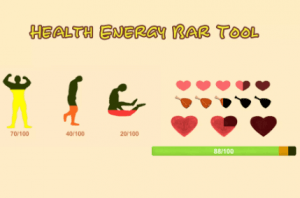
HealthEnergyBarTool makes it easy to create dynamic state UI for your game, such as health bar, energy bar, hunger score, etc

Not just a single bar of blood display, but a representation of many heart images like Zelda can be implemented quickly,or define different display images and colors in multiple states and without any code

Remember, there are many different ways to display, choose one or more of your favorites and join the game!

3 different UI performance effects, a variety of custom dynamic effects

1.LongIconBar:
This is the most common way to display, often used for health, energy and other values

2.OneLongIconBar_ManyStateIcon:
This style builds on OnLongIconBar and changes the current UI image based on the ratio of the current value to the maximum value

3.MultipleIconHealthBar:
This style splits the value into paragraphs, each of which presents the value in a separate UI, similar to Zelda’s Heart Health UI

Completely written in C#, fully using UGUI, clean and simple source code, modular design, easy to use customization and extension

A simple setup will do just that, just a simple setValue ()!

Can be used directly, easy to use!

The tutorial video can be found here
https://www.youtube.com/channel/UCfvn0i64GCtLCbDBQamSAUg

If you like them, we will continue to optimize them and add more new features.

If you have any questions, please contact
[email protected]


Prev Article
Next Article

Related Articles

3D WebView for Android™ and iOS (Web Browser) – Dev Community
Tsunami 22 July, 2025

3D WebView for Android™ and iOS (Web Browser) – Dev Community

Translucent Image – Fast UI Background Blur – Dev Community
Tsunami 8 December, 2025

Translucent Image – Fast UI Background Blur – Dev Community

Universal Settings – Dev Community
Tsunami 16 January, 2026

Universal Settings – Dev Community

Tabbed UI Navigation – Dev Community
Tsunami 23 July, 2025

Tabbed UI Navigation – Dev Community

Leave a Reply Cancel Reply

Recent Posts

  • Tower Defense Game (URP) – Free Download
  • Mesh God 4000 – Mesh Extractor, Pivot & Shading Tools – Free Download
  • Picture Coloring – Color By Numbers Game – Free Download
  • Pure Nature 2 : Swamp – Free Download
  • 2D Top Down RPG Sandbox Project – Free Download

Dev Asset Collection

All Things That You Need to Build A Video Game
Copyright © 2026 Dev Asset Collection
Privacy Policy | Disclaimer | DMCA