Dev Asset Collection

All Things That You Need to Build A Video Game
Menu
  • 2D
    • Characters
    • Environments
    • Fonts
    • GUI
    • Textures & Materials
  • 3D
    • Animations
    • Characters
    • Environments
    • GUI
    • Props
    • Vegetation
    • Vehicles
  • Add-Ons
    • Machine Learning
    • Services
  • Audio
    • Ambient
    • Music
    • Sound FX
  • Essentials
    • Tutorial Projects
  • Templates
    • Packs
    • Systems
    • Tutorials
  • Tools
    • AI
    • Animation
    • Audio
    • Camera
    • Game Toolkits
    • GUI
    • Input Management
    • Integration
    • Level Design
    • Localization
    • Modeling
    • Network
    • Painting
    • Particles & Effects
    • Physics
    • Sprite Management
    • Terrain
    • Utilities
    • Version Control
    • Video
    • Visual Scripting
  • VFX
    • Particles
    • Shaders
Home
3D
Environments
Garden Entrance: The Complete Scene (HDRP) – Free Download

Garden Entrance: The Complete Scene (HDRP) – Free Download

Tsunami 24 March, 2025
Sending
User Rating 0 (0 votes)

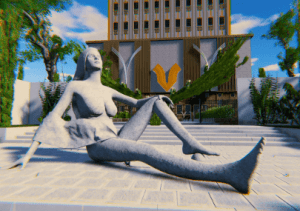
The package contains all the models you can see on the images above, including the building, statue, stairs and all the plants. Also, there is already setup a simple character controller to move around the scene.

For more details about this asset: Click Here

This is a paid asset, but now you can download the “Garden Entrance: The Complete Scene (HDRP)” for FREE. Please keep in mind that this package is provided only for learning purposes or to test before buying the product, NOT FOR COMMERCIAL PURPOSES.

Garden Entrance: The Complete Scene (HDRP) v1.0

Faster Download Download Now

“Sharing is caring”

Description
The package contains all the models you can see on the images above, including the building, statue, stairs and all the plants. Also, there is already setup a simple character controller to move around the scene.

Compatibility: HDRP is needed to correctly display assets in a project.

How to install and set HDRP in a project to display the assets in the correct way?

1. Create a new project.

2. Go to Window -> Package Manager.

3. Change “Packages” from “In Project” to “Unity Registry”.

3. Search for “High Definition RP” and click “Install”.

4. When the installation is completed, an “HDRP Wizard” dialog box should appear. Click “Fix All”.

5. Close the dialog.

6. Import the “Garden Entrance: The Complete Scene (HDRP)” package.

7. Open the “Sample” scene.

8. If you see the flickering anti-aliasing, make sure to enable “Always Refresh” in the top right scene view tab.

9. To enable “Volumetric Clouds”. Go to “Edit” -> “Project Settings” -> “Quality” -> HDRP -> “Lighting” -> “Volumetrics” -> “Volumetrics Clouds”.

You should be able to see the exact same visuals as you can see in the images above.
Technical details
Number of textures: x70 (albedo, normal)

Texture dimensions: 1024x

Minimum polygon count: ~418 tris

Maximum polygon count: ~333.072 trs

Number of meshes/prefabs: 77 prefabs, +20 prefab variants

Rigging: No

UV mapping: No

LOD information: No

Types of materials and texture maps: PBR
Prev Article
Next Article

Related Articles

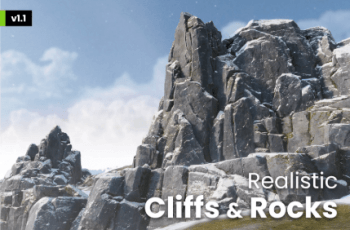
Realistic Cliffs and Rocks – Free Download
Tsunami 5 April, 2025

Realistic Cliffs and Rocks – Free Download

New Textures & Standard Pipeline Conversion for Book of the Dead – Free Download
Tsunami 12 October, 2020

New Textures & Standard Pipeline Conversion for Book of the Dead – Free Download

FANTASTIC – City Pack – Free Download
Tsunami 16 March, 2026

FANTASTIC – City Pack – Free Download

Western Town / Village Pack – Free Download
Tsunami 29 June, 2025

Western Town / Village Pack – Free Download

Leave a Reply Cancel Reply

Recent Posts

  • StrategyCore – Foundation – Free Download
  • Fog City (Mega Bubble) – cyberpunk – Free Download
  • MultiFPS – Multiplayer FPS – Free Download
  • Undead Horse & Knight – Free Download
  • Essential Kit for Mobile & TV – IAP, Leaderboards, Cloud Save, Web View & More – Free Download

Dev Asset Collection

All Things That You Need to Build A Video Game
Copyright © 2026 Dev Asset Collection
Privacy Policy | Disclaimer | DMCA