Dev Asset Collection

All Things That You Need to Build A Video Game
Menu
  • 2D
    • Characters
    • Environments
    • Fonts
    • GUI
    • Textures & Materials
  • 3D
    • Animations
    • Characters
    • Environments
    • GUI
    • Props
    • Vegetation
    • Vehicles
  • Add-Ons
    • Machine Learning
    • Services
  • Audio
    • Ambient
    • Music
    • Sound FX
  • Essentials
    • Tutorial Projects
  • Templates
    • Packs
    • Systems
    • Tutorials
  • Tools
    • AI
    • Animation
    • Audio
    • Camera
    • Game Toolkits
    • GUI
    • Input Management
    • Integration
    • Level Design
    • Localization
    • Modeling
    • Network
    • Painting
    • Particles & Effects
    • Physics
    • Sprite Management
    • Terrain
    • Utilities
    • Version Control
    • Video
    • Visual Scripting
  • VFX
    • Particles
    • Shaders
Home
Tools
Physics
Collision Mesh Generator | Convex Decomposition – Dev Community

Collision Mesh Generator | Convex Decomposition – Dev Community

Tsunami 5 August, 2020
Sending
User Rating 4 (1 vote)

For more detail this asset from the Unity Asset Store: Click Here

Collision Mesh Generator |Convex Decomposition

Download Now

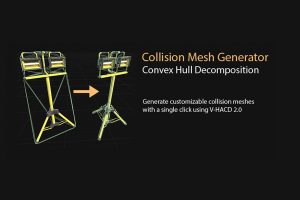
Collision Mesh Generator automatically turns complex meshes into a set of convex hulls that are suitable for realtime collision detection and raycasts, even on mobile devices. Unity only supports mesh to mesh collisions if at least one mesh is convex, so this is a required step even for high end platforms.

• A single mesh is automatically converted into convex MeshColliders with a single click
• Helps with collision detection performance and accuracy
• Enables sophisticated meshes on dynamic bodies and triggers
• Wide support for different Unity versions and rendering pipelines including 2019 and beyond
• Powered by the advanced V-HACD 2.0 algorithm
• Runs entirely in the editor, no runtime scripting needed

The whole process is customizable including generation of collider components, mesh renderers, asset saving for prefab reuse and editing in external 3D modeling software. Full control over the decomposition settings are exposed in the advanced panel.

Compatibility: Supports 64-bit Windows, MacOS, and 64-bit Linux Unity editors. Runtime decomposition is not supported.



Prev Article
Next Article

Related Articles

uTire Dynamic Tire Deformation – Dev Community
Tsunami 26 September, 2021

uTire Dynamic Tire Deformation – Dev Community

Trajectory Predictor – Dev Community
Tsunami 13 December, 2024

Trajectory Predictor – Dev Community

Obi Fluid – Dev Community
Tsunami 16 July, 2025

Obi Fluid – Dev Community

Vive Grip – Dev Community
Tsunami 9 April, 2023

Vive Grip – Dev Community

Leave a Reply Cancel Reply

Recent Posts

  • Impact CFX – Collision Effects System – Dev Community
  • 3D Roguelike RPG Complete Kit for Mobile and PC: TPS, Enemy AI, Puzzle and Props – Dev Community
  • Adventure Creator – Dev Community
  • Lumen: Stylized Light FX 2 – Dev Community
  • OptiTerra (HDRP) – High Performance Terrain Shader – Free Download

Dev Asset Collection

All Things That You Need to Build A Video Game
Copyright © 2026 Dev Asset Collection
Privacy Policy | Disclaimer | DMCA