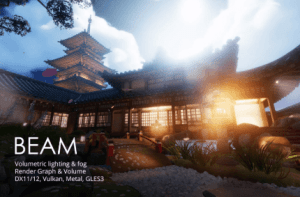
A powerful and beginner friendly volumetric lighting & fog effect for Unity 6 URP that produces sun shaft, light beam and halo effect that will bring your game visual to the next level.
For more details about this asset: Click Here
This is a paid asset, but now you can download the “BEAM – Volumetric Lighting & Fog – Froxel Based – URP” for FREE. Please note that this package is provided solely for learning purposes or to test the product before purchase, and not for commercial use.
BEAM – Volumetric Lighting & Fog – Froxel Based – URP v1.2.0.1 (05 Feb 2026) (Latest version)
“If possible, please buy the package to support the developer”
Description
INTRODUCTION
BEAM is a volumetric lighting & fog effect for Unity, targeting desktop and high end mobile devices. Using froxel-based implementation, it maximizes the computation capability of your GPU cores, low VRAM usage while providing believable visual effect.
BEAM supports all kinds of Unity’s realtime lights (directional, point, spot), with shadow and light cookies.
BEAM was built upon Renderer Feature & Volume framework so you can easily manage the graphics option for your game as well as setting up different moods for each region in the scene (outdoor light rays, indoor, basement fog, etc.)
PROJECT REQUIREMENTS
Unity 6.0 or higher.
Universal Render Pipeline.
Render Graph module enabled (compatibility mode is not supported).
Graphics API: DX11, DX12, Vulkan, Metal, GLES3.
BUILD PLATFORMS
Windows PC (DX11, DX12, Vulkan, GLES3).
MacOS and iOS devices (Metal).
Mid-end, high-end Android devices (Vulkan, GLES3).
DOCUMENTATION
Manual & Scripting API
NOTE
Art assets in the screenshots are:
– URP sample scene.
– Product of other Publishers, used solely for showcasing the effect.
– NOT INCLUDED in this package.
Technical details
CORE FEATURES
Easy to setup: Achieve beautiful volumetric lighting with just a few steps:
Add a renderer feature.
Add a volume override.
Place local fog volumes (optional).
Local fog volumes: An artist driven workflow that let you create different fog setups for different parts of the scene, or use a global fog if you just want to make it quick.
All kinds of realtime light: It automatically render volumetric effect for directional, point and spot lights in the scene, with proper view frustum culling. There are options for excluding additional lights & shadows for optimization.
Light cookies: Render realistic car headlights or stage lights, just assign a cookies texture.
Quality levels: 4 options for different purposes (in game use and cinematic recording).
Fog attenuation: Gradually fade out fog density based on world height and 3D animated noise.
All render paths: Support forward, forward+ and deferred cameras.
Built upon Volume Framework: Behaves the same way as other post processing effect, it lets you gradually change the effect settings based on player location.
Froxel based: That means it simulates light & fog droplets interaction on a 3D grid of cells aligned to camera frustum. This technique was used in the famous Frostbite Engine and can maximize the computation power of your GPU.
Froxel = frustum + voxel