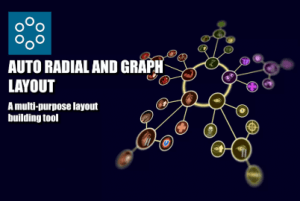
Design simple or intricate radial and graph layouts. Place the prefab and use the inspector buttons to add nodes, the plugin takes care of the rest positioning nodes and creating links automatically.
For more details about this asset: Click Here
This is a paid asset, but now you can download the “Auto Radial Layout” for FREE. Please keep in mind that this package is provided only for learning purposes or to test before buying the product, NOT FOR COMMERCIAL PURPOSES.
Auto Radial Layout v1.2.1 (Latest version)
Auto Radial Layout v1.0.1
“Sharing is caring”
Description
Effortlessly Create Radial and Graph Layouts with Auto Radial Layout!
With Auto Radial Layout, designing simple or intricate radial and graph layouts has never been easier. Simply drop the Radial Layout prefab onto your canvas, and use the intuitive inspector buttons to add or remove nodes. The plugin takes care of the rest, automatically positioning your nodes to create visually appealing layouts.
Need to display connections between nodes? Auto Radial Layout handles that too, automatically generating links to connect nodes seamlessly. Links also feature a progress functionality that allows you to highlight the progress from one node to the next.
For added functionality, the plugin also includes a tag-based query system that allows you to search for specific nodes (or links connecting nodes) within your layout.
Features:
◾ New RadialLayout Component: Easily create and manage radial and graph layouts.
◾ Editor Gizmos and Handles: Quickly adjust the size and rotation of your layouts directly in the editor.
◾ User-Friendly Inspector Buttons: Build and explore complex layouts with just a few clicks.
◾ Two Node Distribution Modes: Choose between Concentric and Branches for flexible layout options.
◾ Sub-Layouts: Nodes can be converted to sub-layouts and viceversa to create nested structures.
◾ Versatile Applications: Perfect for creating skill trees, radial menus, graph UIs, main UI panels, and much more.
◾ Automatic Node Placement with Full Control: Nodes are positioned automatically, but you can customize their placement as needed.
◾ Prefab-Based Instancing: Add empty nodes to just define the layout, or instantiate your own custom nodes and links prefabs with just one click.
◾ Automatic Link Generation: Simply place the nodes, and the plugin will handle link creation for you.
◾ Integrated Radial Menu Functionality: A dedicated Radial Menu component that enables fully customizable and animated radial menus for your games.
◾ Integrated Query System: Easily search for specific nodes within your layout.
Technical details
Supported Render Pipelines: Built-in, Universal, HDRP, Custom
GUI Type: Unity Canvas
Supported Sprite Type: Sprite/2D
Graphical Assets Included: No (only placeholder elements)
Query System: Id-based, Tag-based
Tutorial Included: Yes
Supported OS: Windows, iOS, Android, UWP, macOS