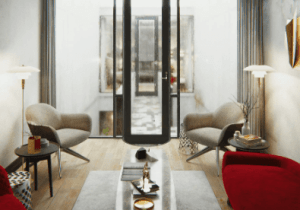
ArchVizPRO Interior Vol.7 URP is an architectural visualization project made in URP and inspired by the Azuma House. It is a fully navigable building with an interior area composed of 4 main rooms and an outdoor area consisting of a small courtyard, stairs, and walkway.
For more details about this asset: Click Here
This is a paid asset, but now you can download the “ArchVizPRO Interior Vol.7 URP” for FREE, Please keep in mind this package is provided only for learning purposes or to be able to test before buying the product, NOT FOR COMMERCIAL PURPOSES.
ArchVizPRO Interior Vol.7 URP v1.1 (Latest version)
ArchVizPRO Interior Vol.7 URP v1.0
“Sharing is caring”
ArchVizPRO Interior Vol.7 URP is an architectural visualization project made in URP and inspired by the Azuma House. It is a fully navigable building with an interior area composed of 4 main rooms and an outdoor area consisting of a small courtyard, stairs, and walkway. Build in every single detail from scratch, this interior has more than 200 furniture and props, custom shaders, and 4K texture. All furniture and props are highly detailed and can be reused in any other project.
Forum Thread / Documentation / Demo_Windows / Demo_Quest
Features:
– URP
– Fully explorable interior
– More than 200 prefabs
– Fist Person, Orbit, Cinematic controllers
– CPU/GPU Progressive ready
– HD 4K Texture
– Post Processing setup
– Custom Shader Graph Shaders
All buyers will get an automatic 50% discount on the HDRP version!
Bonus content:*
– URP VR full project for Quest, already configured and ready to build.
* Bonus content are available on Oneirosvr.com . Registration and invoice number are required to download bonus content from Oneirosvr. Bonus contents are outside Unity Asset Store and don’t receive support.
Please read the Documentation for quick project setup.
Table of content:
Quick Project Setup
Scenes Overview
Progressive Lightmapper
Shader Graph
Contacts
FAQ
Quick Project Setup
1) Open Unity Hub and create a new Unity 2021.3.4f1 (or higher) project with a Universal Render Pipeline Template. (If the URP template is not available, use a 3D Template and install URP from the package manager)
2) Download and import ArchVizPRO Interior Vol.7_URP from Asset Store.
If prompt about Unity Package Manager dependencies chose “Install/Upgrade”.
3) Open Assets\ArchVizPRO_Interior_Vol.7_URP\3D SCENE\ArchVizPRO_Interior_Vol.7_URP.
4) Go to Edit/Project Settings/Graphics and assign the AVP7_UniversalRenderPipelineAsset in Scriptable Render Pipeline Settings.
5) Go to Edit/Project Settings/Graphics/HDRP Global Settings/ and assign the AVP7_UniversalRenderPipelineGlobalSettings in Rendering.
6) Go to Edit/Project Settings/Quality and assign the AVP7_UniversalRenderPipelineAsset in Rendering.
Scenes Overview
Scenes are located at Assets\3D SCENE\ArchVizPRO_Interior_Vol.7_URP:
ArchVizPRO_Interior_Vol.7_URP:
Key ESC: Open/Close Menu
Key 1: First-Person Mode (Default)
Key 2: Orbit Mode
Key 3: Cinematic
Key 4: Cinematic VR
Key WASD: Move character
Key Left Ctrl: Crouch
Key Shift: Sprint
Key Right Mouse Button: Zoom
Mouse: Look
Progressive Lightmapper
ArchVizPRO Vol.7 use Progressive GPU as main baking engine.
It’s tested to work with a GTX 1070 (8Gb VRAM) and it takes around 1 hour to bake.
LOW RAM
With a minor amount of VRAM decrease Lightmap Size and Lightmap Resolution, or you will fallback to Progressive CPU.
To increase available VRAM, a trick is to set in Project Settings/Quality:
Texture Quality = Quarter Res
Once the bake is finished bring back textures to Full Res
SHADOWMASK:
The project use Shadowmask for the main lights.
PLANTS GI Fix
Progressive lightmapper to let the light travel through objects needs a Lit/Transparent shader. Before baking assign the PlantsGI shader to the plants (Assets\ArchVizPRO Interior Vol.7\3D MODEL\Plants), otherwise they will appear too dark. After bake, reassign to the plants their original materials.
Shader Graph
All custom shaders are made in Shader Graph.
They are located in Assets\ArchVizPRO_Interior_Vol.7_URP\3D SHADER\
Fabric Rim: A Fabric shader with Rim.
Particles: Particle Shaders compatible with Shuriken Particle System
Rain Ripples: A flipbook shader that Simulate Rain_Ripple. It uses Vertex Color and a Mask texture to control the effect.
Rain Streaks: A flipbook shader that simulate Rain Streaks on glass windows. It uses a Refraction shader.
Vegetation: Shader that control the wind animation of the plants.
Note. Rain Ripples and Vegetation shaders velocity are controlled by “FunctionRenderTime.cs” script.