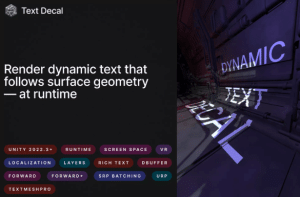
Text Decal combines the versatility of TextMesh Pro with the power of Universal Render Pipeline (URP) Decal Projector. Designed to integrate seamlessly into your project, it enables you to project dynamic, customizable text onto surfaces with minimal setup.
For more details about this asset: Click Here
This package is provided solely for evaluation, learning, or testing purposes before purchase and is not permitted for commercial use.
Text Decal: Dynamic, Surface-Aligned & Shaded v1.2.6 (Latest version)
“If possible, please buy the package to support the developer”
Description
Project crisp, editable TextMesh Pro text onto any mesh in real time—true 3D decals, no texture baking, live editing, and minimal performance overhead.
Perfect for creating immersive text-based environments, in-game overlays, signage, or effects, Text Decal supports custom text mesh modifications, rich text styling, and runtime animations like typing effects. Its compatibility with the Localization package makes it ideal for globalized content, and VR support ensures that your text looks great across platforms.
Key Features
Powered by TextMesh Pro: Built on TextMesh Pro for a familiar and robust text-handling experience.
Easy Setup: Minimal configuration with step-by-step instructions provided.
Rich Text Support: Includes color & alpha, bold text, multiline, outstroke.
Custom Mesh Modifications: Modify character positions at runtime through scripts.
URP Decal Integration: Works with Screen Space and DBuffer modes in URP’s Decal Renderer Feature.
Rendering Layers: Control where decals are rendered using rendering layer system.
Localization Ready: Fully compatible with Localization package.
Cross-Platform Support: Works across desktop, mobile, and VR platforms.
Limitations:
Some TextMesh Pro features are not supported: underline, strikethrough, italic text, glow.
Shader Graph are not supported yet.
Dependencies:
Unity 2022: TextMeshPro com.unity.textmeshpro
Unity 6: Unity UI com.unity.ugui
Projects using the asset:
Ecorche: Portrait Anatomy
SimplePlanes 2
Additional Information:
This shader has been designed with flexibility and performance in mind, but not all features may be listed here. If you encounter specific use cases or have feature requests, feel free to contact the developer for support and updates.
Asset uses Inter font under SIL Open Font License; see Third-Party Notices.txt file in package for details.
Regular updates and improvements will be provided based on user feedback.
Bring dynamic text decal effects into your project with ease!
Technical details
Compatible with Unity 2022.3 or latest.
Rendering Pipeline: Universal Render Pipeline (URP).
Decal Modes: Supports Screen Space and DBuffer decal rendering in URP (Automatic mode is not supported).
Shaders: Includes Lit and Unlit shaders.
Compatibility: Works with TextMesh Pro (TMP) and Localization package.
Supported Platforms: Desktop, mobile, WebGL and VR.
Customizability: Shader code written in HLSL for easy modifications.
Project Requirements:
To ensure the shader works seamlessly, the following settings must be configured in your project:
Add Decal Renderer Feature and Text Decal Renderer Feature.
Import TextMeshPro Essentials.
Add the provided TextDecal.cs script and shader files and configure materials for TextMesh Pro objects.
Use provided shaders for a font material.