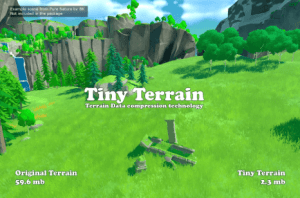
Tiny Terrain is a lossy Terrain Data compression technology for Unity Terrain Engine, which allows you to reduce the size of the data that Terrain takes in the project many times and significantly reduce the size of your application.
For more details about this asset: Click Here
This package is provided solely for evaluation, learning, or testing purposes before purchase and is not permitted for commercial use.
Tiny Terrain v1.3.2 (Latest version)
Tiny Terrain v1.3.1
“If possible, please buy the package to support the developer”
Technical details
Tiny Terrain is a lossy Terrain Data compression technology for Unity Terrain Engine, which allows you to reduce the size of the data that Terrain takes in the project many times and significantly reduce the size of your application.
You pay a little CPU time and additional memory usage, but save tens and hundreds of megabytes for each Terrain in the project.
Even though the compression is lossy, in most cases you won’t see any visual difference at all.
A very high compression ratio is achieved due to the author’s data preparation algorithms and then compression using Brotli.
Even if your build or AssetBundle is already compressed using LZ4, LZ4HC or LZMA, Tiny Terrain will be able to reduce its size. Of course the difference in size won’t be as huge as with the uncompressed data, but it’s still pretty big.
The asset has highly optimized code using direct memory access, which allows for fast compression and decompression, and minimizes additional memory usage. On average, one Terrain is loaded in about 1 second.
Tiny Terrain is not a 3rd party Terrain Engine, and you can use Unity Terrain API and any terrain tools you like, such as Real World Terrain, Gaia, Vegetation Studio, etc.
Using Tiny Terrain is very easy, and anyone can do it, even if it is their first day using Unity.
Just add Tiny Terrain Loader component to Terrain and click Compress.
If you are an advanced user or programmer, Tiny Terrain has events and API that will help you take full control of the loading process.
Features:
High compression ratio from 3:1 to 30:1 with no visible difference, and up to 100:1 with visible quality loss:
– Heightmap. Compression from 2:1 to 10:1;
– Alphamap. Compression from 5:1 to 50:1;
– Detailmap. Compression from 5:1 to 20:1 lossless. Note: Unfortunately, I don’t have exact information on how Unity Terrain Engine stores detailmaps, so compression ratio is based on my observations;
– Trees. Compression 3:1;
– Holes. Compression from 1000:1 to 10000:1 lossless;
Minimal visual differences. In most cases, you won’t see visual difference at all;
Does not affect rendering and can be used with any Render Pipeline: Built-in RP, URP, HDRP, custom RP;
Fast compression and decompression;
Synchronous, asynchronous and multi-threaded decompression;
Terrain API and third party tools for Terrain can be used;
Third party terrain shaders like RTP and GTS can be used;
API for compression and decompression;
Built-in update system.
Platforms:
The asset was tested on PC, Mac, Android, iOS, WebGL.
The rest of the platforms have not been tested, but the asset should also work well on them.
Warranty:
Worried about the quality of the asset or are not sure that it is suitable for your project?!
After the purchase you have two weeks to test.
If the asset is not suitable for your project, has any problems or you simply do not like it, contact us and we will make a refund.
Other Infinity Code assets:
Huge Texture allows you to import and use textures larger than 8192x8192px.
Internet Data Framework – Build, test, and use REST APIs through a visual workspace with environments, auth profiles, request preview, mock responses, OpenAPI / Swagger import, history, caching, and code generation support.
Mesh to Terrain is a tool for easily and quickly converting a 3D terrain model created in 3ds Max, Terragen or any other editor to Unity Terrains.
Online Maps is a universal multi-platform mapping solution for your 2D, 3D, AR / VR and mobile applications and games.
Project Context Actions – speed up your work with Project window.
Real World Terrain is a tool for automatically creating high-quality terrains, meshes, Gaia stamps and RAW files based on real-world data with global coverage.
Run Desired Scene allows you to run any scene without opening it.
Runtime Object Exporter is a tool that exports dynamically generated content into reusable Project Assets (Mesh/Material/Texture/Prefab) or external OBJ/FBX packages.
Smart Gallery is an elegant, flexible and efficient solution for displaying image, video and audio galleries for your project.
Terrain Quality Manager is a tool for changing the resolution of Unity Terrain maps (Heightmap, Detailmap, Alphamap and Basemap) without losing data.
Tree Tool allows you to manage each tree individually.
Ultimate Editor Enhancer is a toolkit that take your workflow in Unity Editor to a next level, simplifies working with content, adds new features to the editor, corrects and improves the editor’s built-in behaviors.
uPano is a universal solution for displaying dynamic and static panoramas, and creating virtual tours.
Value Observer is an editor-friendly implementation of the Observer pattern. Allows you to easily write quality code with weak dependencies, and improve the performance of your application.