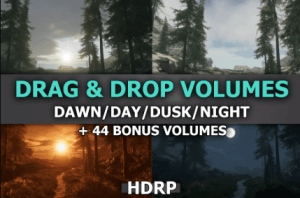
The package was created to speed up the setting of the light as much as possible. Just add the selected prefab to the scene to get ready lighting regardless of the assets used.
For more details about this asset: Click Here
This is a paid asset, but now you can download the “Drag&Drop Volumes” for FREE. Please note that this package is provided solely for learning purposes or to test the product before purchase, and not for commercial use.
Drag&Drop Volumes v8.1 (05 Dec 2025) (Latest version)
Drag&Drop Volumes v7.0 (15 Jun 2025)
“Sharing is caring”
Description
“Drag&Drop Volumes” have been created based on my series of tutorials on realistic lighting.
Now you can benefit from my knowledge without the need to spend time recreating them. These prefabs are ready for immediate use and placement in your scene.
Forget about spending hours fine-tuning lighting and shadow settings. It has all been done for you.
“Drag&Drop Volumes” is an asset package that empowers you to instantly create lighting on your scene. It includes four prefabs that are ready to be dropped into your project scene, containing preset Directional Light and Global Volumes.
To further speed up the selection of the appropriate Volume, the package includes a tool that allows switching Volumes with a single click, without the need to drag and drop each Volume onto the scene.
With upcoming updates, “Drag&Drop Volumes” will introduce additional prefabs with preconfigured lighting settings. From cave lighting to misty scenes and beyond, these additions will allow you to further customize the lighting to suit your unique needs.
With “Drag&Drop Volumes,” creating stunning, realistic, and atmospheric environments becomes easy, fast, and enjoyable. All you need is a few seconds and a few clicks to enrich your game or project.
Roadmap:
– next bonus volume
– more volumes…
Technical details
4 Drag&Drop Volumes including ready lighting during Dawn/Day/Dusk/Night
44 Bonus Drag&Drop Volumes including ready lighting for various environments.
Volume Switcher allows you to change Volume on scene with one click
3 Fog Volumes ready to be put on scene to increase the realism of lighting.
Particle simulating falling snow
Volumetric Cloud or Cloud Layer depending on what you need*
Demo scene so you can check what each lighting looks like.
More Bonus Drag&Drop Volumes will be added in future updates.