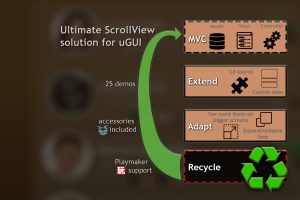
OSA still provides a plethora of shiny features, making it the ultimate replacement of Unity’s built-in Scroll View. Display large amounts of data efficiently through a List, Grid or Table, on any device!
For more details about this asset: Click Here
This is a paid asset, but now you can download the “Optimized ScrollView Adapter” for FREE, Please keep in mind this package is provided only for learning purposes or to be able to test before buying the product, NOT FOR COMMERCIAL PURPOSES.
Optimized ScrollView Adapter v7.2.1 (Latest version)
Optimized ScrollView Adapter v5.1.2
Optimized ScrollView Adapter v5.0
“Sharing is caring”
Until quantum computers become mainstream, we need to optimize our ScrollViews!
OSA can display large amounts of data efficiently through a List, Grid or Table, on any device.
Even if speed is not a concern for you, OSA still provides a plethora of shiny features, making it the ultimate replacement of Unity’s built-in Scroll View.
Create your own customized implementation or get started in just 1 minute via OSA wizard and continue expanding according to your needs, guided by the provided demos.
YouTube: 3.0 | 3.1 | 4.1 | 4.3 | 5.0
Apps using OSA | In-browser demo (WebGL) | Android demo (APK)
Manual | Playmaker tutorial
Forum | Discord chatroom
Highlights
• Works on any device
• Can handle 2 billion items (int.MaxValue-1)
• Variable data set
• Items can have different sizes
• Support for Content Size Fitter for items with unknown initial size
• TableView to allow displaying/modifying values from table-like data
• GridView with fixed or auto-adaptable number rows/columns
• Vertical/horizontal orientation and optional spacing/padding
• Custom rotation and scaling, including that of any CanvasScaler
• Configurable snapping
• Responsive to changes in viewport’s size
• Multiple item types
• Change item size in real time (ex. animations), even if it’s not visible
• Infinite looping, optional
• Smoothly scroll to a specific item
• Extensible source code provided
• Partially customizable recycling policy through provided callbacks
• Enhanced scrollbar functionalities via ScrollbarFixer, which adds auto-hide/hide-when-not-needed animations
• Dragging the items within the list(re-ordering), between 2 lists (transferring) or outside (orphaning)
• Scrolling speed can optionally accelerate with each subsequent drag to navigate faster within the list on demand
Goodies
• LazyList data structure optimized for large amounts of data
• AsyncBufferredDataSource class to aid in scenarios where data isn’t readily available
• Content background scrolling effect, with optional parallax effect
• Gallery effect – middle items bigger than side items, or custom, including changes in rotation
• Nested ScrollViews are supported out of the box (disabled by default, for performance), including nesting a regular ScrollRect as parent/child
• Simple ExpandCollapseOnClick utility script in the example scenes that can be used to expand/shrink items on click
• Supports all Canvas spaces
• PullToRefresh-PullToLoadMore utility script
• DateTime picker pop-up utility which can be used from anywhere (one line of code)
• RemoteImageBehavior – a full solution for downloading images with caching support and adaptive queue management
• PackedGridLayout – a self-contained script for arranging items of different sizes in a given amount of space as efficiently as possible
Playmaker support
• At least Unity 2017.1 needed
• Lists, grids, date-time picker, content size fitter(items of variable sizes), large data sets.
• The demo scenes included do not have Playmaker-counterparts, though this may change in the future. Please watch the tutorial to see how to create Playmaker-ready OSAs through the OSA wizard instead
(!) Moderate programming experience required. Not needed in case of Playmaker users, which have access to a limited set of features.
Free micro-version
ScrollView Adapter (Non-Optimized) is available for free. It’s just an alternative for those that don’t need optimization or any of the OSA’s nice features. It’s very basic and it doesn’t share the same code with OSA – you can think of it as a completely separate package.