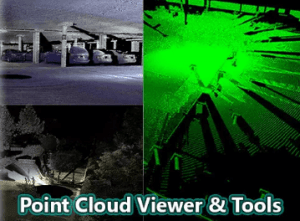
Point Cloud Viewer & Tools is a solution for viewing laser scanned point cloud data inside Unity.
For more details about this asset: Click Here
This is a paid asset, but now you can download the “Point Cloud Viewer and Tools” for FREE, Please keep in mind this package is provided only for learning purposes or to be able to test before buying the product, NOT FOR COMMERCIAL PURPOSES.
Point Cloud Viewer and Tools v2.70
“Sharing is caring”
Main features:
– DX11 Point Cloud Viewer (up to 40 million points using single color *could depend on your hardware stats)
– Single color and RGB point cloud shaders included (for both DX11 & non-dx11 modes)
– Supported import formats: XYZ, XYZRGB, CGO, ASC, CATIA ASC, PLY (ASC)
– Editor plugin#1: Point Cloud To Binary (saves data to custom binary format for faster reading)
– Editor plugin#2: Point Cloud To Unity Meshes (splits point cloud data into 65k meshes)
– Brekel Point Cloud Pro v2 binary file support (view & convert animated point clouds)
* Check pdf below for more details!
Main limitations:
– Main viewer requires DX11 (does not work on Apple Macs)
– Can only display 1 cloud at a time (so you must combine clouds and filter them to have suitable data)
– If you use RGB colors, maximum is ~20million (instead of 40mil) *New: With Unity 5.1 tested loading 75million points (single color) ~10fps in editor..
– Current version loads the points at Start() function, you need to modify the viewer script if you want it to load them some other time
– There is no any “API”, just few normal unity c# scripts & shaders to display the points
– Not much error checking is done on imported files, if they are different from supported file formats, most likely it breaks
Documentation PDF:
PointCloudViewerTools_web13.pdf *old version
Roadmap/future plans:
– Support for float RGB values (currently it expects int values 0-255)
– DX11 point size (if its possible to make it work)
– New import formats
– Add touch screen flying controls for the mobile demo
– Include webplayer compatible reader (instead of using System.IO) : (*In v1.3)
– Support for point normals (*New v1.3 import normals for PLY (ascii), only for cloud2mesh, not in DX11)
– .LAS file format support (import) (*in v1.8)
– .PTS file format support (import) (*in v1.8)
– more.. (feel free to comment/request)
Wishlist / Requests:
– DX11 Point Size
– .E57 file format support
– Support for point normals dx11 (need to somehow pack the normals into position or color values..)
– Support for .abc / .fbx / .obj formats
– Shaders for points + unity lights (pretty much needs normals, unless make it just distance based brightness)
– Clipping boxes / planes
– Taking measures *available as customized work (but starts to get slow with over 5-10mil. points)
– LOD (based on camera distance and/or octree lods)
– Compressed or less precision binary format (smaller files)
– Oculus version of the pc demo scene
Bugs:
– (14.4.2014): Mesh Converter: If point amount is less than “Vertices per mesh” amount, cloud meshes are not generated. This will be fixed in next update (or email me for manual fix) **Fix submitted to asset store 27.4.2014)
Demos:
PC exe 2.5million points (dx11) : mediafire | dropbox
Android (.apk) 2.5 million points (non-dx11) : mediafire | dropbox (*60fps in Samsung Galaxy S4)
iPhone5 : Doesnt seem to work properly, hangs, point sizes are wrong etc.. will test again with unity4.6 or 5..