For more details about this asset: Click Here
This is a paid asset, but now you can download COLR – Coloring Redefined for FREE, Please keep in mind this package is provided only for learning purposes or to be able to test before buying the product, NOT FOR COMMERCIAL PURPOSES.
COLR – Coloring Redefined v2.5.0 (Latest version)
COLR – Coloring Redefined v2.1.0
(Tested with Unity version 2020.3.23f1)
COLR Coloring Redefined v1.9.1
“Sharing is caring”
COLR Coloring Redefined This asset supports the Built-in (Standard) Rendering Pipeline and the Universal Rendering Pipeline (URP / LWRP).
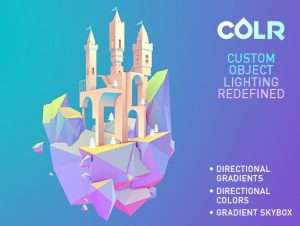
Colr is the set of shaders designed to make coloring of objects quick and easy. Colr helps you achieve stylish and consistent look for your game by letting you select colors of material sides directly, bypassing lighting.
Colr features:
• Color everything: apply directional (per-side) GRADIENTS and/or SOLID colors to objects; fill skybox with gradient
• Uses no lighting, thus performs fast and has a clean look.
• Mobile friendly
• Can use diffuse texture maps if needed, but does not require them in any way. • Adjustable. A variety of handy parameters provided for you to tweak
• Easy to use. Can be used on any object, just assign the shader to a material
• Includes three different demo scenes with lots of presets and models
Demo of Island Scene (WebGL)
Web Page
Online Documentation
Note:
Since Unity 5.5.0 it is not possible to detect lightmaps in shader code. If using lightmaps (which we totally recommend), please turn them on in the COLR material properties.
Update 1.5:
– It is now possible to apply textures to objects.
Update 1.7:
– It is now possible to have gradients of arbitrary angle, not only vertical ones! The feature has been added to both world and local variants of shaders.
For extended capabilities, check out the Marvelous Techniques asset, which inspired Colr.
Check out our complete project – Flight Kit which includes Colr and a demo game.