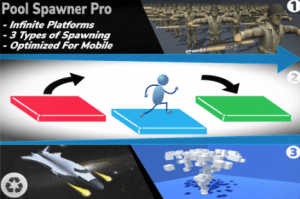
This is a paid asset, but now you can download Pool Spawner Pro for FREE, Please keep in mind this package is provided only for learning purposes or to be able to test before buying the product, NOT FOR COMMERCIAL PURPOSES.
For more details about this asset: Click Here
Pool Spawner Pro v1.1
“Sharing is caring”
Pool Spawner Pro makes it easy for you to generate objects in any way you like. It is a perfect fit for endless runner games such as Subway Surfers, Temple Run and Crossy Road.
It is perfect for mobile games because it doesn’t consume much power making your game run smoothly.
It uses object pooling to spawn objects efficiently. Unlike Unity’s built-in Instantiate() and Destroy() function, object pooling is much more performant because it doesn’t consistently create and destroy new objects but reuse the same objects.
3 different systems are included in this asset pack to make it easy for you to manage the essential parts of your games
1. Dynamic Spawn
This system is responsible for generating infinite platforms. You can control a lot of things through the inspector window to manage the number of different objects to be spawned and their position, rotation, scale, probability, and a lot more.
You can set a maximum distance in which the objects travel at which everything is reset/brought back to the origin/center of the scene to prevent floating-point errors.
2. Fixed Spawn
This system generates objects at a specified point in the scene. For example, you can have a spacecraft shoot or create particle effects such as rain fx. Refer to video for more info.
3. Area Spawn
This system generates objects in a grid with a specified size. The objects in the grid can be modified at runtime and in the editor. It is perfect for generating soldiers in rows and columns like in Lords Mobile video game
The possibilities with this tool are endless. Your imagination is key for using this asset the way you want.
To set up your project to use this asset, follow the steps in the documentation provided or take a look at the demo scenes provided.
If you encounter any problems, send us an email at [email protected]
Please leave a review to tell us how we did!
We hope you enjoy this asset!