Dev Asset Collection

All Things That You Need to Build A Video Game
Menu
  • 2D
    • Characters
    • Environments
    • Fonts
    • GUI
    • Textures & Materials
  • 3D
    • Animations
    • Characters
    • Environments
    • GUI
    • Props
    • Vegetation
    • Vehicles
  • Add-Ons
    • Machine Learning
    • Services
  • Audio
    • Ambient
    • Music
    • Sound FX
  • Essentials
    • Tutorial Projects
  • Templates
    • Packs
    • Systems
    • Tutorials
  • Tools
    • AI
    • Animation
    • Audio
    • Camera
    • Game Toolkits
    • GUI
    • Input Management
    • Integration
    • Level Design
    • Localization
    • Modeling
    • Network
    • Painting
    • Particles & Effects
    • Physics
    • Sprite Management
    • Terrain
    • Utilities
    • Version Control
    • Video
    • Visual Scripting
  • VFX
    • Particles
    • Shaders
Home
Tools
Game Toolkits
Lively Chat Bubbles – Dev Community

Lively Chat Bubbles – Dev Community

Tsunami 8 September, 2023
Sending
User Rating 5 (1 vote)

For more detail this asset from the Unity Asset Store: Click Here

Lively Chat Bubbles v1.3

Download Now

“Sharing is caring”

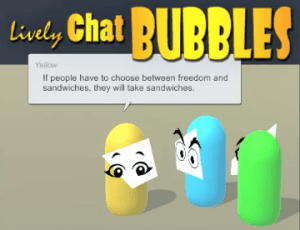
Lively Chat Bubbles is a complete system that allows you to create, configure and execute dynamic communication throughout a scene. Very easy to use components and video tutorials show the depth and breadth of the system.

All of the hard work of placement, sizing, speed, audio and visibility have been implemented and documented in this easy to use package.

FEATURES INCLUDE

Chat Bubble
– Rich text fully supported.
– Auto resize based on the message content.
– Fully customize the style, minimum sizing and wrapping width.
– Configure each border allowing a dynamic extender to slide gracefully.

Chat Anchor
– Default the radius and angle from the anchored transform for the bubble to be displayed.
– Adjust the placement dynamically towards the center of the screen by a given percentage.
– Enforce the bubbles to stay completely on the screen when the anchored transform nears the screen bounds.

Chat Output
– Configure how fast text is output along with all characters that should delay the output slightly.

Chat Mouthpiece
– Brings all of the above components together allowing developers to call a simple Speak() method passing a message.
– Set the name, chat bubble prefab, chat anchor, chat output settings and audio clip to use when speaking.
– Mouthpieces can be configured differently giving them a unique personality while speaking.




Prev Article
Next Article

Related Articles

CBS – Cross-platform Backend Solution (Playfab) – Dev Community
Tsunami 16 November, 2025

CBS – Cross-platform Backend Solution (Playfab) – Dev Community

Car Stunts Track Generator Mobile – Mega Ramp Mobile – Dev Community
Tsunami 3 June, 2025

Car Stunts Track Generator Mobile – Mega Ramp Mobile – Dev Community

Voxel Play 2 – Dev Community
Tsunami 27 June, 2025

Voxel Play 2 – Dev Community

Ultimate Character Controller (legacy) – Dev Community
Tsunami 25 February, 2024

Ultimate Character Controller (legacy) – Dev Community

Leave a Reply Cancel Reply

Recent Posts

  • Animalia – Starter Kit – Dev Community
  • Online Maps v4 – Dev Community
  • Checkout Frenzy – Convenience Store Simulator – Dev Community
  • POLYART-Modular Fantasy Male – Dev Community
  • Cartoon Farm Islands / Exteriors – Dev Community

Dev Asset Collection

All Things That You Need to Build A Video Game
Copyright © 2026 Dev Asset Collection
Privacy Policy | Disclaimer | DMCA