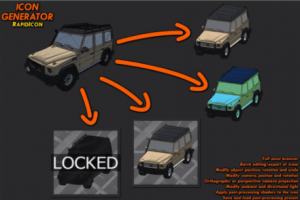
An icon generator for your models and prefabs that works inside of Unity. RapidIcon is an easy to use icon generator/creator for your models and prefabs…
For more details about this asset: Click Here
This package is provided solely for evaluation, learning, or testing purposes before purchase and is not permitted for commercial use.
RapidIcon | In-Editor Icon Generator v1.7.4 (Latest version)
RapidIcon | In-Editor Icon Generator v1.7.3
RapidIcon | In-Editor Icon Generator v1.7.2
RapidIcon | In-Editor Icon Generator v1.7.1
RapidIcon | In-Editor Icon Generator v1.6
RapidIcon In-Editor Icon Generator v1.5
“Sharing is caring”
An icon generator for your models and prefabs that works inside of Unity
RapidIcon is an easy to use icon generator/creator for your models and prefabs
Simply navigate to the folder in your project where your models are saved, select the icons you wish to edit, edit them if you need to, and then export them
Features included:
Full asset browser which automically detects all models and prefabs
Batch editing of icons
Batch export of icons
Modify object position, rotation and scale in the icon
Modify camera, postion and rotation
Modify object animations (experimental, requires being in play mode and object must use Animator component)
Orthographic or perspective camera projection
Modify ambient and directional light (colour, direction and intensity)
Apply post-processing shaders to the icon (image-effect shaders)
Five post-processing shaders included
Image overlay
Image underlay
Mask
Transparancy
HSV
Supports virtually any image-effect shader so create your own or download from the store
Save post-processing presets to load later on
Toggle premultiplied alpha
Switch between point, billinear, and trillinear filtering
Change the export resolution (min: 8×8 px, max: 2048×2048)
Icons exported into the project assets folder will have the asset import settings automically set correctly
Please read the documenation for full details
If you have any questions, please get in touch and I will be happy to help
Generates icons for models and prefabs within the project.
Exports to PNG up to 2048×2048 pixels.
See description for full list of features.