Dev Asset Collection

All Things That You Need to Build A Video Game
Menu
  • 2D
    • Characters
    • Environments
    • Fonts
    • GUI
    • Textures & Materials
  • 3D
    • Animations
    • Characters
    • Environments
    • GUI
    • Props
    • Vegetation
    • Vehicles
  • Add-Ons
    • Machine Learning
    • Services
  • Audio
    • Ambient
    • Music
    • Sound FX
  • Essentials
    • Tutorial Projects
  • Templates
    • Packs
    • Systems
    • Tutorials
  • Tools
    • AI
    • Animation
    • Audio
    • Camera
    • Game Toolkits
    • GUI
    • Input Management
    • Integration
    • Level Design
    • Localization
    • Modeling
    • Network
    • Painting
    • Particles & Effects
    • Physics
    • Sprite Management
    • Terrain
    • Utilities
    • Version Control
    • Video
    • Visual Scripting
  • Uncategorized
  • VFX
    • Particles
    • Shaders
Home
Tools
Camera
Camera Fit: Screen Handler – Dev Community

Camera Fit: Screen Handler – Dev Community

Tsunami 21 April, 2022
Sending
User Rating 0 (0 votes)

For more detail this asset from the Unity Asset Store: Click Here

Camera Fit Screen Handler v1.1

Download Now

“Sharing is caring”

Works with Unity 4.6, 5, 2017, 2018 and above.

Camera Fit is the easy way to handle screen aspect ratio for different devices, screens and window sizes!

Works on Mobile devices and all other platforms.

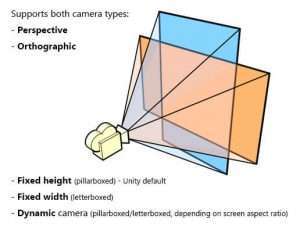
Supports both, orthographic (2D) and perspective (3D) cameras.

Has three different modes:
– Fixed height (pillarboxed) – Unity default.
– Fixed width (letterboxed).
– Dynamic (pillarboxed/letterboxed, depending on screen aspect ratio).

With the Dynamic mode, a specified area (main game area) will always be visible, no matter what screen/window size you choose – the Camera Fit component will adjust the frustum to always keep that area on-screen.

The Dynamic mode also lets you snap the main game area to the edges of the screen vertically/horizontally or always keep it in the middle.

Ask questions or discuss the plugin here.


Prev Article
Next Article

Related Articles

Camera Path for 2D and 2.5D Platform Games – Dev Community
Tsunami 6 November, 2020

Camera Path for 2D and 2.5D Platform Games – Dev Community

MMO Camera – Dev Community
Tsunami 2 October, 2022

MMO Camera – Dev Community

Ultimate Replay 3.0 – Dev Community
Tsunami 19 May, 2026

Ultimate Replay 3.0 – Dev Community

Adaptive Split Screen – Dev Community
Tsunami 18 August, 2025

Adaptive Split Screen – Dev Community

Leave a Reply Cancel Reply

Recent Posts

  • Killer Doll Animations – Free Download
  • Real-Time Weather PRO – Free Download
  • Virtualizing Tree View – Free Download
  • Essential Footsteps SFX – Free Download
  • Monster Sounds – Sound Effects – Free Download

Dev Asset Collection

All Things That You Need to Build A Video Game
Copyright © 2026 Dev Asset Collection
Privacy Policy | Disclaimer | DMCA