This is a paid asset, but now you can download Selection Utility for FREE, Please keep in mind this package is provided only for learning purposes or to be able to test before buying the product, NOT FOR COMMERCIAL PURPOSES.
For more details about this asset: Click Here
Selection Utility v1.2 (Latest version)
Selection Utility v1.0
“Sharing is caring”
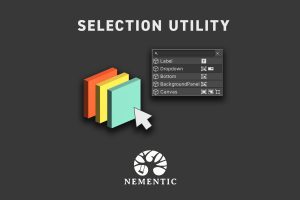
The Selection Utility is a lightweight Unity tool that facilitates selecting GameObjects in the Scene view by displaying a context menu with all objects currently under the mouse cursor as a popup list.
Features
• Works with 2D, 3D, and UI objects
• Scrollable list
• Does not interfere with regular scene controls (camera pan, zoom, etc)
• Respects Unity’s builtin selection features (e.g. locked layers)
• Search by name or component type
• Component icons to identify objects easily
• Prefabs are indicated in blue
• Supports large scenes and many entries in the list
• Looks good in Unity’s light and dark skin
• Source code included
User Preferences
• Hide icons by their type (e.g. Transform)
• Global enabled flag
• Click dead zone (e.g. touchpad & accessibility)
• Search field toggle
Why do I need this?
This tool improves the default selection methods in Unity. Trying to find a GameObject in a long list within the Hierarchy window can be difficult, since names may not be perfectly descriptive for all use-cases (e.g. props are named Rock_00, Rock_01, etc). Often, it is easier to find objects by their position and context in the Scene view. However, since Unity also considers invisible and overlapping objects, it can require many clicks until the desired target is selected. With Selection Utility the same can be accomplished in typically two clicks, but it also supports a search within the spatial context of the mouse pointer.
Version Support
Supported from Unity Version 2018.4.0 LTS onward, but should also work in older versions. Contact us for any inquiries!
![Favorites Tab[s] – Free Download](https://unityassetcollection.com/wp-content/uploads/2024/08/Favorites-Tabs-350x230.png "Favorites Tab[s] – Free Download")