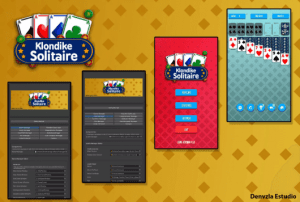
Klondike Solitaire Game Engine is a complete and easy-to-use game template that allows you to create a Solitaire Game of any kind. With controls for mobile and other touch devices included, creating your own Solitaire game has never been this easy!
For more details about this asset from the Unity Asset Store, please visit: Click Here
This is a paid asset, but now you can download the “Klondike Solitaire Game Engine” for FREE. Please note that this package is provided solely for learning purposes or to test the product before purchase, and not for commercial use.
Klondike Solitaire Game Engine v2.2.1
“If possible, please buy the package to support the developer”
Description
Easy to use and modify, a beginner could easily understand this template and be up and running in no time!
Klondike Solitaire Game Engine is a complete and easy-to-use game template that allows you to create a Solitaire Game of any kind. With controls for mobile and other touch devices included, creating your own Solitaire game has never been this easy!
The rules follow the classic game of Solitaire which is known all over the world.
Simply select cards with a single touch on your device. It’s that easy!
Playing the game is simple and fun, but mastering it can be quite a challenge.
FEATURES
Full Editor
Randomized card deck
Touch the cards!
Complete set of GUI
NO CODING REQUIRED
Unity ADS for Android and iOS
| Quick Guides|
INTEGRATIONS
ADS Monetization Manager For UnityADS And Google Admob
General:
Improved custom editor
Improved camera
Improved curve shader with more vibrant colors
New Shader System
URP support
New Welcome Window with the Shaders option, you can install one of the 2 available shaders: Build-In Shaders and URP Shaders, it only allows you to install one, all automatic, detects the installed shader.
Option to uninstall or switch to another shader.
Option to clean the shader folder.
Once installed, allows you to automatically update all object materials with a single button. It avoids the shaders for skyboxes, text, FX, and particles. It automatically detects alpha, transparent, normal, and opaque materials.
Before updating, make a backup copy of your project.
Pattern System
A bug that caused overlapping objects has been fixed.
Limitations have been added to be able to create a Pattern System and avoid overlaps.
More than 2 objects are required in a Pattern System
All the initial and final spaces of the Pattern System cannot be left empty
Warning messages have been added to indicate to the user when the Pattern System is invalid and could cause overlaps.
*It is recommended to enter the Pattern System tab and check all the created Patterns. Instantiate Objects by distance
A bug that caused overlapping objects has been fixed.
Fixed a bug that caused it not to generate correctly