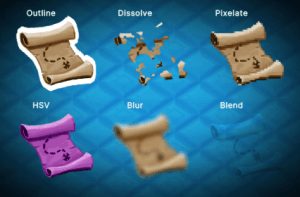
Adds a “Custom Shader Image“ element to your UI Builder Library that allows you to use a custom material on an image.
For more details about this asset: Click Here
This package is provided solely for evaluation, learning, or testing purposes before purchase and is not permitted for commercial use.
UI Toolkit Custom Shader Image URP v1.0.3
“If possible, please buy the package to support the developer”
Description
⚠️ This asset is NOT for uGUI. It’s for the new UI Toolkit.
Adds a „Custom Shader Image“ element to your UI Builder Library that allows you to use a custom material on an image.
✔️ Unity 6
Support 2022.3+ and 2023 too.
✔️ Code-Free Usage
Just drop in the image and select a material.
✔️ Shader Graph
Make your own shaders manually or with Shader Graph
✔️ Blend Modes
Configure the blend modes to your liking for maximum effect.
✔️ Examples
Hand written shaders and shader graph examples are included.
✔️ Full source code included
I publish this asset with full source code because as a developer I know how annoying it is to not have source code access. If you like it then please remind others to purchase the plugin. Don’t just copy and paste it everywhere. Thank you ❤️
Things you should know (👓 please read this before you buy)
There is an online manual. Please read it before using the asset.
😲️ Again, this is NOT a UGUI or IMGUI asset. This is for the new UI Toolkit.
⚠️ You need Unity 2022.3 or higher.
⚠️ URP only: While the image element works find in all render pipelines the demo shaders have only been tested in URP. I have had users reporting that some work in Built-In too but that’s not tested. If there is enough demand I may port them to HDRP and Built-In (please let me know).
⚠️ As of now (Unity 6.x and before) in UI Toolkit your shaders do NOT have access to the frame buffer. Thus no grab pass will work. This means you can not take previously rendered content into account (except via blend modes). I.e.: the shader is ONLY applied to the texture (sprite) you set, not the background or the borders.
⚠️ Batching: Custom Shader usage breaks UI Toolkit batching. Therefore you should use these custom shader images sparingly. Don’t plaster your whole UI with them.
⚠️ No anti-aliasing for rounded corners on the inside if intersecting with the sprite texture. Pretty specific, I know, but it’s a UIToolkit limitation, hopefully they will patch it some day. Most users will never notice.
⚠️ VR Support Unknown: I don’t own a VR headset so I can not really test it (though I think it should work). If you have tried it on VR please let me know.
✍️ Usage
1) Open the UI Builder Window
2) Add a new CustomShaderImage element from the Library > Project > Kamgam section.
3) Assign a UI Toolkit compatible material (check out the examples)
4) Done.
😎 HINT 1:
The demo shaders have support for sliced multi-sprites including tiling.
🧐 HINT 2:
Use the Tint (_Color) of the example shaders to change only the alpha of the image and not the borders.
🤠 HINT 3:
Check out the shader graph examples. The dissolve effect is a simple graph.