Dev Asset Collection

All Things That You Need to Build A Video Game
Menu
  • 2D
    • Characters
    • Environments
    • Fonts
    • GUI
    • Textures & Materials
  • 3D
    • Animations
    • Characters
    • Environments
    • GUI
    • Props
    • Vegetation
    • Vehicles
  • Add-Ons
    • Machine Learning
    • Services
  • Audio
    • Ambient
    • Music
    • Sound FX
  • Essentials
    • Tutorial Projects
  • Templates
    • Packs
    • Systems
    • Tutorials
  • Tools
    • AI
    • Animation
    • Audio
    • Camera
    • Game Toolkits
    • GUI
    • Input Management
    • Integration
    • Level Design
    • Localization
    • Modeling
    • Network
    • Painting
    • Particles & Effects
    • Physics
    • Sprite Management
    • Terrain
    • Utilities
    • Version Control
    • Video
    • Visual Scripting
  • VFX
    • Particles
    • Shaders
Home
Tools
Input Management
Retro Horror Template – Mobile Controls – Free Download

Retro Horror Template – Mobile Controls – Free Download

Tsunami 4 August, 2026
Sending
User Rating 0 (0 votes)

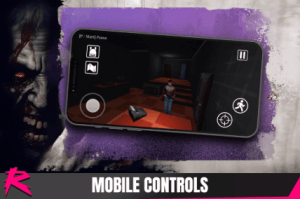
This addon includes a UI gameplay overlay and a set of UI prefabs preconfigured to be compatible with phone screens.

For more details about this asset: Click Here

This package is provided solely for evaluation, learning, or testing purposes before purchase and is not permitted for commercial use.

Retro Horror Template – Mobile Controls v1.0.1 (Latest version)

VIP Only

“If possible, please buy the package to support the developer”

Description

Additionally, it includes a preset HECore asset using the new prefabs to speed up the setup process.

Add the Mobile-specific prefabs into your HECore.
The project includes an HECorePrefabs asset already configured for mobile. Simply use this asset in your scene HECore to enable mobile controls.

Use the HECorePrefabs in all your scenes HECore or create a prefab variant of HECore using your game HECorePrefabs asset.

Change the PlayerInput prefab DefaultScheme to Any and disable Auto-Switch.

Inside the prefab HECore.CursorController, make sure StartInUI is checked.

If that variable is still not there (new version still not published) then simply comment this line inside CursorController.cs

Add the Mobile-specific prefab to the main menu.
Replace the LoadScreen in the main menu with the mobile-specific prefab UIMobileLoadScreen

Get paid unity asset for free
Prev Article

Related Articles

Control Freak 2 – Touch Input Made Easy! – Free Download
Tsunami 18 April, 2026

Control Freak 2 – Touch Input Made Easy! – Free Download

Uduino Plugin: Wifi for esp8266 and esp32 – Free Download
Tsunami 19 January, 2023

Uduino Plugin: Wifi for esp8266 and esp32 – Free Download

Pool Spawner Pro – Free Download
Tsunami 30 November, 2023

Pool Spawner Pro – Free Download

Gesture Recognizer – Free Download
Tsunami 7 September, 2020

Gesture Recognizer – Free Download

Leave a Reply Cancel Reply

Recent Posts

  • Stylized Fantasy Nature Bundle – Free Download
  • CombatGirls_DualKatanaCharacterPack – Free Download
  • Farm Animals Pack Cute Series – Free Download
  • Versatile Car – Free Download
  • Retro Horror Template – Mobile Controls – Free Download

Dev Asset Collection

All Things That You Need to Build A Video Game
Copyright © 2026 Dev Asset Collection
Privacy Policy | Disclaimer | DMCA