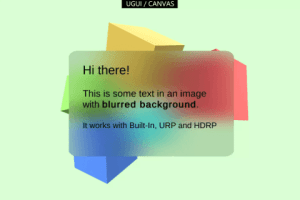
Blurred backgrounds for UGUI / Canvas for all render pipelines (URP, HDRP, Built-In), 2D and 3D. It also supports world, camera and overlay canvases.
For more details about this asset: Click Here
This package is provided solely for evaluation, learning, or testing purposes before purchase and is not permitted for commercial use.
UGUI Canvas Blurred Background – Fast translucent UI Blur HDRP, URP, Built-In RP v1.4.7
“If possible, please buy the package to support the developer”
Description
🐭 This asset is part of the UI Bundle🐭
Blurred backgrounds for UGUI / Canvas for all render pipelines (URP, HDRP, Built-In), 2D and 3D. It also supports world, camera and overlay canvases.
Nicely blurred see-through UI for everyone.
✅ Unity 6 ready
⚠️ NO XR/VR Support (sorry)
✔️ Super easy to use
No setup or coding required. Add the component and you are done.
✔️ Works with ALL render pipelines
Built-In, URP and HDRP are supported. 3D and even experimental* 2D support. Supports Unity 6 with Render Graph too!
✔️ Works with ALL canvas types (Overlay, World, Camera)
*Unity’s special 2D URP renderer only supports OVERLAY canvases (details in the manual). “2D URP” means the special 2D renderer by Unity. The default URP renderer supports ALL canvas types just fine.
✔️ Works with masking and sprite shapes
It can do most* of what the normal image can do as it extends the normal image component.
*Sliced sprites are not supported at the moment. If you want to mask the image based on a sliced sprite I’d recommend putting the blurred image into a mask and use the sliced sprite as the mask image (that will work). The masks in the demo use SPRITE SHAPES for masking, not alpha images. – This is under investigation and may change in a future update.
✔️ Performant shader
No grab pass. It uses a simple 2-pass blur (horizontal, vertical) with very few texture lookups. It operates on a downsampled color buffer taken directly from the camera (command buffer).
✔️ WebGL
Supports WebGL on desktop and mobile.
✔️ Supports Gamma and Linear color space
✔️ Enter Play Mode Settings Support
Skip the assembly reload. Fast iteration guaranteed!
✔️ Examples included
Go to Kamgam/UGUIBlurredBackground/Examples to open the demo scene.
✔️ Settings & Documentation
Multiple quality settings so you can adapt it to your needs. There is a manual with lots of images and explanations.
✔️ Full Source Code included!
I publish this asset with full source code because as a developer I know how annoying it is to not have source code access. If you like it then please remind others to purchase the plugin. Don’t just copy and paste it everywhere. Thank you ❤️
✔️ Supports Unity 2022.3+, 6.0 LTS, 6.3 LTS (yes, Render Graph in URP is supported)
It may work with earlier versions too but those are neither tested nor officially supported.
Plsase notice that only LTS versions are guaranteed to be supported. Betas etc. are support on a best effort basis but not guaranteed.
Unity decided to drop 2021 support of packages on the Asset Store so the 2021.x version is now officially out of support (no more updates).
⚠️ NO VR Support: I have had reports that it is NOT working on a Quest 2 which leads me to believe it’s not working in VR.
⚠️ UI over UI blur requires a layered setup: It’s possible if you make your UI a CAMERA-SPACE UI. Please check the manual as there are a lot of caveats with UI-over-UI blur. There are some UI over UI blur demos included
⚠️ URP 2D Renderer Support is very limited
Basically it only works with Screen-Spave-Overlay canvases and it ignores all post-processing on the scene. Please check the manual for more details.
🎮 Try before you buy
Here are some demos for you to try.
Android apk (Built-In)
Pc (URP)
Pc (URP 2D)
Pc (HDRP)
WebGL
Things you should know (read this before you buy)!
😲 This is NOT an asset for the new UI Toolkit. If you need UI Toolkit blur then please check out my UI Toolkit Blurred Background asset.
⚠️ At the moment there is only one global blur strength setting. This means that all blurred backgrounds will have the same blur strength. The most recent activated image will take precedence. If you need more please let me know. If demand is high enough it may be added.
⚠️ UI over UI blur is tricky. Please check the manual for more details.
⚠️ It assumes forward rendering. Deferred rendering has only been tested on HDRP 2022.2, 2022.3 and Unity 6 HDRP. Other versions are untested.
If you have written your own SRP then please notice this adds a render pass for the “RenderPassEvent.AfterRenderingPostProcessing” for OVLERAY canvases and a “RenderPassEvent.BeforeRenderingTransparents” for WORLD and CAMERA canvases.
⚠️ *URP 2D support is experimental, meaning only screen space OVERLAY canvases are supported and even those do not render any Post-Processing effects. Please read the manual for more info on why (it’s primarily due to Unity limitations). Hopefully this will change in the future.
⚠️ NO VR Support: I have had reports that it is NOT working on a Quest 2 which leads me to believe it’s not working in VR.
✍️ Usage
1) Right-click and choose UI > UI Blurred Backgroun Image.
2) Done. No further setup is neeed. It behaves just like any normal image.
😎 HINT 1:
Use some alpha on the tint in combination with a bright background image to simulate some semi-transparent white glass (instructions in the manual).
🧐 HINT 2:
Try a low resolution for your highly blurred backgrounds. Doing that you can save some resources. Better spend those fps elsewhere!
🤠 HINT 3:
If you want to disable the blur for a while then set the strength to 0. This will completely disable the effect.
🤓 HINT 4:
If you enable “Use Sprite Mesh” then you can use the sprite mesh as a mask (the “heart” in the demo uses this).
🤫 HINT 5:
The blur is rendered (extracted) once per frame from your already rendered color buffer. This means it has very little overhead and it does not matter how big your blurred UI is. Don’t be afraid to go full screen. Additional Hint: It looks extra cool if you animate the blur 😉