Dev Asset Collection

All Things That You Need to Build A Video Game
Menu
  • 2D
    • Characters
    • Environments
    • Fonts
    • GUI
    • Textures & Materials
  • 3D
    • Animations
    • Characters
    • Environments
    • GUI
    • Props
    • Vegetation
    • Vehicles
  • Add-Ons
    • Machine Learning
    • Services
  • Audio
    • Ambient
    • Music
    • Sound FX
  • Essentials
    • Tutorial Projects
  • Templates
    • Packs
    • Systems
    • Tutorials
  • Tools
    • AI
    • Animation
    • Audio
    • Camera
    • Game Toolkits
    • GUI
    • Input Management
    • Integration
    • Level Design
    • Localization
    • Modeling
    • Network
    • Painting
    • Particles & Effects
    • Physics
    • Sprite Management
    • Terrain
    • Utilities
    • Version Control
    • Video
    • Visual Scripting
  • VFX
    • Particles
    • Shaders
Home
Tools
GUI
Pinnr – World to Screen UI – Free Download

Pinnr – World to Screen UI – Free Download

Tsunami 21 May, 2026
Sending
User Rating 0 (0 votes)

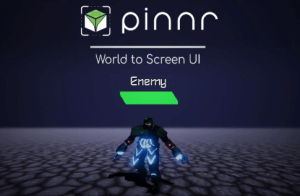
Pinnr sets your UI element position based on a specific target world object’s position while maintaining to be displayed on top.

For more details about this asset from the Unity Asset Store, please visit: Click Here

This is a paid asset, but now you can download the “Pinnr – World to Screen UI” for FREE. Please note that this package is provided solely for learning purposes or to test the product before purchase, and not for commercial use.

Pinnr – World to Screen UI v1.6.4

VIP Only

“If possible, please buy the package to support the developer”

Description
Pinnr is a tool that will help you to create UI elements that follow world space object’s position. It uses Unity’s built-in canvas and/or UI Toolkit document, mainly in screen space render mode. This enables the UI elements to follow the position of the target world space object without affecting the rotation and size that usually caused by the world space camera angle and perspective.

Features:

• Compatible with all UGUI Canvas or UI Toolkit panel settings’ scale modes, including Constant Pixel Size, Scale With Screen Size, and Constant Physical Size

• Run in edit mode

• Update position automatically / manually

• Proximity-based scaling

• Supports multiple canvas

• Supports both Screen Space and World Space Render Mode (World Space Render Mode is only supported for UGUI Canvas, not UI Toolkit Panel Settings)

Usage Examples:

• Health bar on top of player

• Object interaction menu

• Target crosshair

• and more!

World to Screen Space UI Templates:

• Progress Bars (Compatible with both Point & Stretch Anchor):

– 9-Sliced

– Filled

– Radial

• Radar:

– Fixed Point Distance/Radius (Detect Target’s Angle Only)

– Detect Target’s Radar Position

• GameObject Collider Selection (2D and 3D)

– Single Selection (Pointer Click)

– Multi Selection (Box Selection)

Technical details
Track world space object’s position and keep rendering the UI element on top of screen
Fixed rotation and scale regardless of the object’s rotation and distance
Get paid unity asset for free
Prev Article

Related Articles

UI Toolkit Visual Scripting – Node based coding essentials for UI Elements – Dev Community
Tsunami 25 July, 2025

UI Toolkit Visual Scripting – Node based coding essentials for UI Elements – Dev Community

Text Animator for Unity | UI Toolkit and Text Mesh Pro – Dev Community
Tsunami 26 April, 2026

Text Animator for Unity | UI Toolkit and Text Mesh Pro – Dev Community

UI Advanced Mask – Dev Community
Tsunami 21 March, 2023

UI Advanced Mask – Dev Community

Modern UI Pack – Dev Community
Tsunami 19 November, 2025

Modern UI Pack – Dev Community

Leave a Reply Cancel Reply

Recent Posts

  • Retro Arsenal – Free Download
  • Shatter Stone: Fossils – Free Download
  • Pinnr – World to Screen UI – Free Download
  • Infinite Runner Engine 3D – Dev Community
  • OmniShade Pro – Mobile Optimized Shader – Dev Community

Dev Asset Collection

All Things That You Need to Build A Video Game
Copyright © 2026 Dev Asset Collection
Privacy Policy | Disclaimer | DMCA