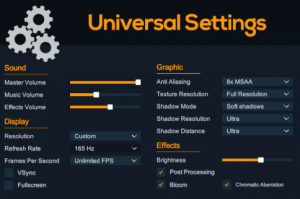
Universal Settings provides a complete game configuration system that allows adjustments for Display, Graphics, Effects, and Sound, while also offering options to create custom components.
For more details about this asset: Click Here
This is a paid asset, but now you can download the “Universal Settings” for FREE. Please note that this package is provided solely for learning purposes or to test the product before purchase, and not for commercial use.
Universal Settings v1.0.1 (Latest version)
“Sharing is caring”
Description
???? Quick Start in 2 steps
With just 2 steps, you can have Universal Settings ready to be used however you want.
???? Fully customizable UI
You can create the UI in any way you like. Universal Settings brings life to Unity’s Slider, Toggle, and Dropdown (TextMeshPro or Legacy) components.
???? Auto save
The Settings are automatically saved using Unity’s PlayerPrefs.
???? Post-processing and Renderer Features
Post-processing effects and any renderer feature can be easily enabled or disabled anywhere that contains a Toggle component.
???? Quality selector
You can create as many Settings Profiles as you want, set their default values, and use the Quality Settings Dropdown component to create a quality selector.
???? Custom configurations
How about a Toggle that turns blood on/off in the game? Or a Slider to adjust mouse sensitivity while aiming with a weapon? Or a Dropdown to choose which device to use as a microphone? There are no limits to the possibilities with the Custom Boolean Toggle, Custom Float Slider, and Custom Integer Dropdown components.
???? Audio Mixer volume
It’s possible to control the volume of any AudioMixer using the Audio Mixer Volume Slider component. This way, you give players the control to separately adjust the volume of music, sound effects, voice chat, and more.
???? 23 UI Components
Quality Settings Dropdown
Display
Fps Dropdown
Fullscreen Toggle
Refresh Rate Dropdown
Resolution Dropdown
Vsync Toggle
Graphic
Anti Aliasing Dropdown
Shadow Distance Dropdown
Shadow Mode Dropdown
Shadow Resolution Dropdown
Texture Resolution Dropdown
Effect
Brightness Slider
Post Processing Effect Toggle
Post Processing Toggle
Renderer Feature Toggle (URP only)
Sound
Audio Mixer Volume Slider
Master Volume Slider
Custom
Custom Boolean Toggle
Custom Float Slider
Custom Integer Dropdown
Button
Apply Settings
Reset Settings
Undo Settings