For more details about this asset: Click Here
This is a paid asset, but now you can download Bone Controller for FREE, Please keep in mind this package is provided only for learning purposes or to be able to test before buying the product, NOT FOR COMMERCIAL PURPOSES.
Bone Controller v0.587 (Latest version)
“Sharing is caring”
Bone Controller v0.586
Bone Controller v0.585
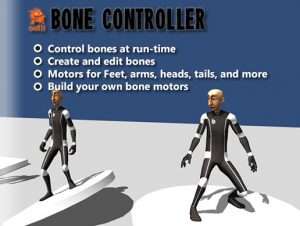
Bring your baked animations to life with real-time bone control!
In modern games, players expect your characters to react to the enviroment in a realistic way. Whether it’s foot placement, real-time looking, or swinging pony-tails players want thier characters to feel alive.
The Bone Controller doesn’t just give you out-of-the box access to these features, it also gives you a simple way to create your own bone motors. Using standardized bone settings, you can add limits, colliders, and motors to totally customize your character.
Built to be easy to use and expandable, the Bone Controller works with your existing character controller or the Motion Controller to bring your avatars to life…human and non-human!
Features Include:
* Extract bone data from any skinned mesh
* Create bones from meshes (no weighting)
* Use IK/FK for real-time bone control
* Apply joint constraints to the bones
* Apply bone colliders for collision detection
* Use skeleton ray-casting for bone collisions
* Use pre-built motors with your characters
* Create custom motors to drive bones
* Use physics for pony tails, tails, ropes, etc.
* Use with standardized bones for all models
* Blend with existing animations
* Use with prefabs
* C# code, so you can modify as needed
* Works with Unity and Unity Pro
* Rely on top notch support
Pre-built Motors Include:
* Look-at Motor
* Swing-at Motor
* Foot Placement Motor
* Limb Reach Motor
* Chain Drag Motor
* Pose Motor
* Finger Pose Motor
* Impact Motor
* Rotation Motor
Web Demo
Forum
Videos
Quick-Start Guide
User’s Guide
Builder’s Guide
Support:
There is no universal standard for how artists create and rig characters. If you have a character that doesn’t seem to be working well with the BC, please be patient and let me know.
As always, please feel free to leave questions and comments on the forum or my email: support@ ootii.com
Credit and permissions from:
Raw Mocap data for Mecanim from Unity.
Allosaurus from Tibor Szijjarto.
Turrets Pack from Vertex Studio.

![More Effective Coroutines [PRO] – Free Download](https://unityassetcollection.com/wp-content/uploads/2021/04/More-Effective-Coroutines-PRO-350x230.jpg "More Effective Coroutines [PRO] – Free Download")