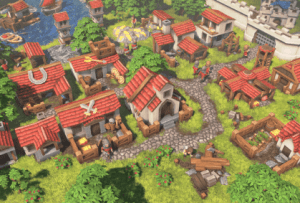
This pack contains all the buildings and props needed for an RTS or top-down RPG village in a cartoony, medieval, or fantasy style.
For more details about this asset: Click Here
This is a paid asset, but now you can download the “RTS Pack – Stylized Buildings, Props, Ships Set” for FREE. Please keep in mind that this package is provided only for learning purposes or to test before buying the product, NOT FOR COMMERCIAL PURPOSES.
RTS Pack – Stylized Buildings, Props, Ships Set v1.5 (Latest version)
“Sharing is caring”
Description
Navy Update: 12 ships added and several resource crates.
This pack contains all the buildings and props needed for an RTS or top-down RPG village in a cartoony, medieval, or fantasy style. Buildings are suitable for mobile, with most under 1000 triangles, and are able to render efficiently with the SRP batcher. Player color for all Buildings and Characters can be configured in the materials. The 3 included starter characters include several common RTS animations, and are compatible with other Humanoid animations – get more from Mixamo.
Buildings (average 800 triangles):
– Town Center
– Barracks
– Archery Range
– Stables
– Blacksmith
– Church
– Farm
– Dock x2
– Granary x3
– House x3
– Market
– Storehouse
– Lumber Yard
– Mine
– Outpost
– Watch Tower
– Fortress
– Castle
– Wall segments (x6)
– Wall Gate
Construction (average 594 triangles):
– Generic 1×1 (x3)
– Generic 1×3
– Generic 2×2
– Generic 3×3
– Archery Range
– Barracks
– Stables
– Blacksmith
– Church
– Farm
– House
– Lumberyard (use with Mine and Granary2 and Granary3 too)
– Tower
Ships (average 2000 triangles)
– Raft/Row Boat (x2)
– Fishing Ships (x3)
– Transport/Sloop Ships (x3)
– Ballista Ship
– Cannon Ship
– Galleon Ship
– Pirate Ship
Tree Props (see image):
– Tree (two different styles) (average 1667 triangles)
– Sapling trees (x2) (average 210 triangles)
Other Props (see image) (under 210 triangles):
– Berry Bush
– Rocks (x2)
– Resources (Gold/Stone Piles, Gold/Iron Stacks)
– Tools (Axe, Pickaxe, Sword, Arrow)
– Containers (Barrel, Trough, Bucket, Vase (x4), Sack, Crates (x7))
– Training (Archery Target, Dummy)
– Hay Bale
– Basket (x3)
– Flag
– Cannon Ball and Ballista Bolt
Characters & Animation (average 1200 triangles):
– Archer (Idle, Walk, Run, AttackArcher)
– Swordsman (Idle, Walk, Run, Attack)
– Worker (Idle, Walk, Run, Attack, Build) (Includes Axe and Hammer prop)
(characters are compatible with Humanoid animations)
Others
– Stylized ground textures (Grass, Dirt, Cobblestone)
– Water shader (waves, shimmer, caustics, foam, depth fade) (URP Only!)
Troubleshooting:
– Everything is purple: Ensure you have imported the Shader Graph package and you are using the correct Demo scene. If you do not want to use Shader Graph, extract the package RTSToonBuildings/NoShaderGraph.package, which includes Materials, Prefabs, and a Demo scene which do not require Shader Graph. If you do not need player colours, you can overwrite the shader for all materials to the Standard shader of your Render Pipeline. Materials are in RTSToonBuildings/Materials. Image example.
– Player colours are very bright: The shader is designed to work in Linear Color Space. Change the “Color Space” under Project Settings, or remove the Color Conversion nodes in the shader.
– I need help with something: Please email the address listed under “Publisher Info” with any questions or requests.
– Water shader looks wrong: Water shader requires URP. Make sure you enable Depth Texture and Opaque Texture in URP Render Pipeline Asset.
– I need more help: Email any questions to the support email listed under Publisher Info.
Technical details
The default materials require Shader Graph. If you do not wish to use Shader Graph, extract the included NoShaderGraph.package or change the Shader of all materials (in RTSToonBuildings/Materials) to the Standard shader and ensure the correct Albedo texture is assigned.
Includes:
– 2048×2048 diffuse texture for solid geometry (buildings and props) with player color mask packed into the Alpha channel.
– 1024×1024 masked diffuse texture for masked surfaces (leaves and bushes).
– 1024×1024 diffuse texture for characters with player color mask in the Alpha channel.