Dev Asset Collection

All Things That You Need to Build A Video Game
Menu
  • 2D
    • Characters
    • Environments
    • Fonts
    • GUI
    • Textures & Materials
  • 3D
    • Animations
    • Characters
    • Environments
    • GUI
    • Props
    • Vegetation
    • Vehicles
  • Add-Ons
    • Machine Learning
    • Services
  • Audio
    • Ambient
    • Music
    • Sound FX
  • Essentials
    • Tutorial Projects
  • Templates
    • Packs
    • Systems
    • Tutorials
  • Tools
    • AI
    • Animation
    • Audio
    • Camera
    • Game Toolkits
    • GUI
    • Input Management
    • Integration
    • Level Design
    • Localization
    • Modeling
    • Network
    • Painting
    • Particles & Effects
    • Physics
    • Sprite Management
    • Terrain
    • Utilities
    • Version Control
    • Video
    • Visual Scripting
  • VFX
    • Particles
    • Shaders
Home
VFX
Particles
Stylized Shoot & Hit Vol.2 – Dev Community

Stylized Shoot & Hit Vol.2 – Dev Community

Tsunami 19 March, 2025
Sending
User Rating 0 (0 votes)

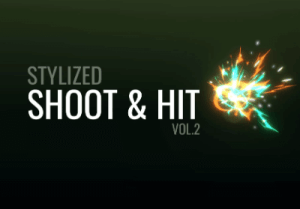
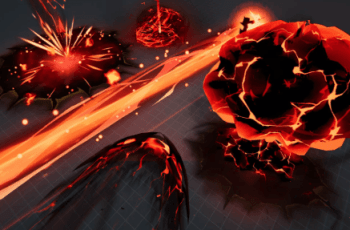
Include 9 different lowpoly weapon modeling included. Made in Blender. 3 Shaders. 16 different effect sets.

For more detail this asset from the Unity Asset Store: Click Here

Stylized Shoot & Hit Vol.2 v1.2 (13 Mar 2025) (Latest version)

Faster Download Download Now

Stylized Shoot & Hit Vol.2 v1.1

Download Now

“Sharing is caring”

Description
Stylized Shoot & Hit Vol.2

◇ 3 Materials

◇ 3 textures

– 1 Effect Set Texture (1024*1024)

– 2 Modeling Texture (1024*1024)

◇ 14 meshes

(9 different lowpoly weapon modeling included. Made in Blender)

– Arrow (20 verts, 31 edges, 22 tris)

– Axe (76 verts, 148 edges, 140 tris)

– Bomb (282 verts, 576 edges, 560 tris)

– Card (14 verts, 19 edges, 12 tris)

– Dagger (55 verts, 100 deges, 90 tris)

– Hammer (73 verts, 140 edges, 138 tris)

– Ice (28 verts, 45 edges, 52 tris)

– Kunai (85 verts, 176 edges, 170 tris)

– Shuriken (172 verts, 380 edges, 344 tris)

◇ 3 Shaders

◇ 16 different effect sets

Total 47 prefabs

Available in Built-in, URP and HDRP

※ Please check the following ※

▶ If you are going to import to your package, you need to click ‘Skip’ in the Warning window when importing in the Package Manager window.

▶ If you use an Orthographic Camera, and if your project environment is 2D or 2D Experimental, set the “Use SoftParticle Factor?” boolean parameter of all materials to off.

▶ To use in Built-in, you have to install “Shader Graph” from package manager.

And also your project version must be 2021.2.0 or higher.
Prev Article
Next Article

Related Articles

Unique Stylized Explosions – Vol. 1 – Dev Community
Tsunami 17 June, 2025

Unique Stylized Explosions – Vol. 1 – Dev Community

VFX Graph – Stylized Laser Beams – Vol. 1 – Dev Community
Tsunami 22 March, 2026

VFX Graph – Stylized Laser Beams – Vol. 1 – Dev Community

UNI VFX: Missiles & Explosions for Visual Effect Graph – Dev Community
Tsunami 30 July, 2024

UNI VFX: Missiles & Explosions for Visual Effect Graph – Dev Community

Procedural Aurora – Dev Community
Tsunami 13 July, 2020

Procedural Aurora – Dev Community

Leave a Reply Cancel Reply

Recent Posts

  • OptiTerra (HDRP) – High Performance Terrain Shader – Free Download
  • MIGHTY FPS HEATMAPS – Free Download
  • Scene Pilot Pro – Free Download
  • Fantasy User Interface Sounds – Lite Edition – Free Download
  • Advanced Multiplayer Game Template – Dev Community

Dev Asset Collection

All Things That You Need to Build A Video Game
Copyright © 2026 Dev Asset Collection
Privacy Policy | Disclaimer | DMCA