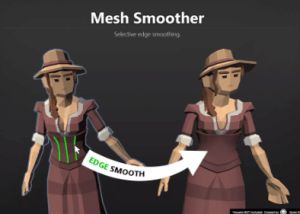
Smoothed Meshes can be stored as files (.asset or .obj). No coding skills required. Simply open the Mesh Smoother tool and you are ready to go. All your animations, blend shapes, etc. will remain intact.
For more details about this asset: Click Here
This is a paid asset, but now you can download the “Mesh Smoother – Mesh Edge Normal Editor, Mesh Modifier” for FREE, Please keep in mind this package is provided only for learning purposes or to be able to test before buying the product, NOT FOR COMMERCIAL PURPOSES.
Mesh Smoother – Mesh Edge Normal Editor, Mesh Modifier v1.0.2 (May 3, 2024) (Latest version)
Mesh Smoother – Mesh Edge Normal Editor, Mesh Modifier v1.0.1
“Sharing is caring”
Selectively smooth edges inside Unity.
😺 This asset is also part of the Mesh Tools Bundle. 😺
😎 Easy to use
No coding skills required. Simply open the Mesh Smoother tool and you are ready to go.
✔️ Non-Destructive Worflow
Smoothed Meshes can be stored as files (.asset or .obj).
All your animations, blend shapes, etc. will remain intact.
✔️ Precise Edge Normal Recalculation
A convenient way of selectively smoothing a subset of edges.
NOTICE: It does NOT introduce any new faces (this is not a beveling tool).
✔️ Full Source Code
I publish this asset with full source code because as a developer I know how annoying it is to not have source code access. If you like it then please remind others to purchase the plugin. Don’t just copy and paste it everywhere. Thank you ❤️
✔️ Supports Unity 2021.2+, 2022, 2023, 2024, … LTS
It may work with earlier versions too but those are not tested anymore.
📚 Lots of documentation
Check out Kamgam/MeshSmoother/MeshSmootherManual.pdf
👇 Things you should know 👇 (Read this before you buy):
There is an intro section in the manual. Please read it first.
⚠️ This is NOT a beveling tool. It will NOT introduce any new geometry. All it does is give you a convenient way of recalculating parts of your mesh normals.
⚠️ .OBJ as a file format can not store animations. If you want to store animations, blend shapes etc. in a file then please use the Unity asset format (that’s the default anyways).
⚠️ Edge sharpening is currently not supported since that would introduce new geometry (new vertices). However, I may add sharpening if there is enough demand for it (and if this sells well enough, tbh).
⚠️ Please be aware that the higher the polygon count the more CPU power this tool will require. There is no hard limit, it’s just that it really depends on how fast your CPU is. Thousands of polys should be fine. Hundred thousands or millions may not.
✍️ Usage
1) Select your model.
2) Open the Mesh Smoother Tool
3) Pick the edges
4) Click “Smooth”
☎️ Support
If you have any questions please write to office[at]kamgam.com. Please be patient, replies may take a few days. Please include your Asset Store Order Nr and the exact Unity version in your request. Please also try upgrading to the most recent LTS version before asking. Thank you.
❤️ If you like this asset then maybe you’ll like these too:
🧤 Double Sided Mesh without shaders
Make your mesh double sided within seconds.
✂ Mesh Extractor
Separate your assets into useful parts within seconds.
🖌 Polygon Material Painter
Create new sub meshes inside Unity for any model.
⚙ Settings Generator
One Settings UI + API for all render pipelines.
🔑 License Info
This asset requires one license per seat (user who has access to the asset files). If you are a team then please consider buying one seat per Unity user.
Why am I telling you this?
Because most people do not know. In fact any asset found under the Tools category falls under a license type collectively known as Extension Assets (see official license explanation) which differs from the standard (Entity) licenses.
If you have questions about the license then please contact me under office[at]kamgam.com.
The Assets shown in the video and screenshots are not included.
These highly recommended Assets have been used:
* POLYGON Western by the Synty Studios team. Go check out their stuff. Their assets are great.